

Why a Crypto Sell Reservation Remains Unfilled Even After the Trigger Price Is Reached: Order Price Settings and How to Check Stop-Loss Orders
A crypto sell reservation does not automatically complete a sale when the trigger price is reached. Once the trigger condition is met, a sell order is submitted at the specified order price, while actual execution takes place separately depending on the exchange's bid prices and trading volume. Therefore, resolving an unfilled stop-loss order requires distinguishing between trigger activation, order submission, and actual execution. Based on 2026-11-26
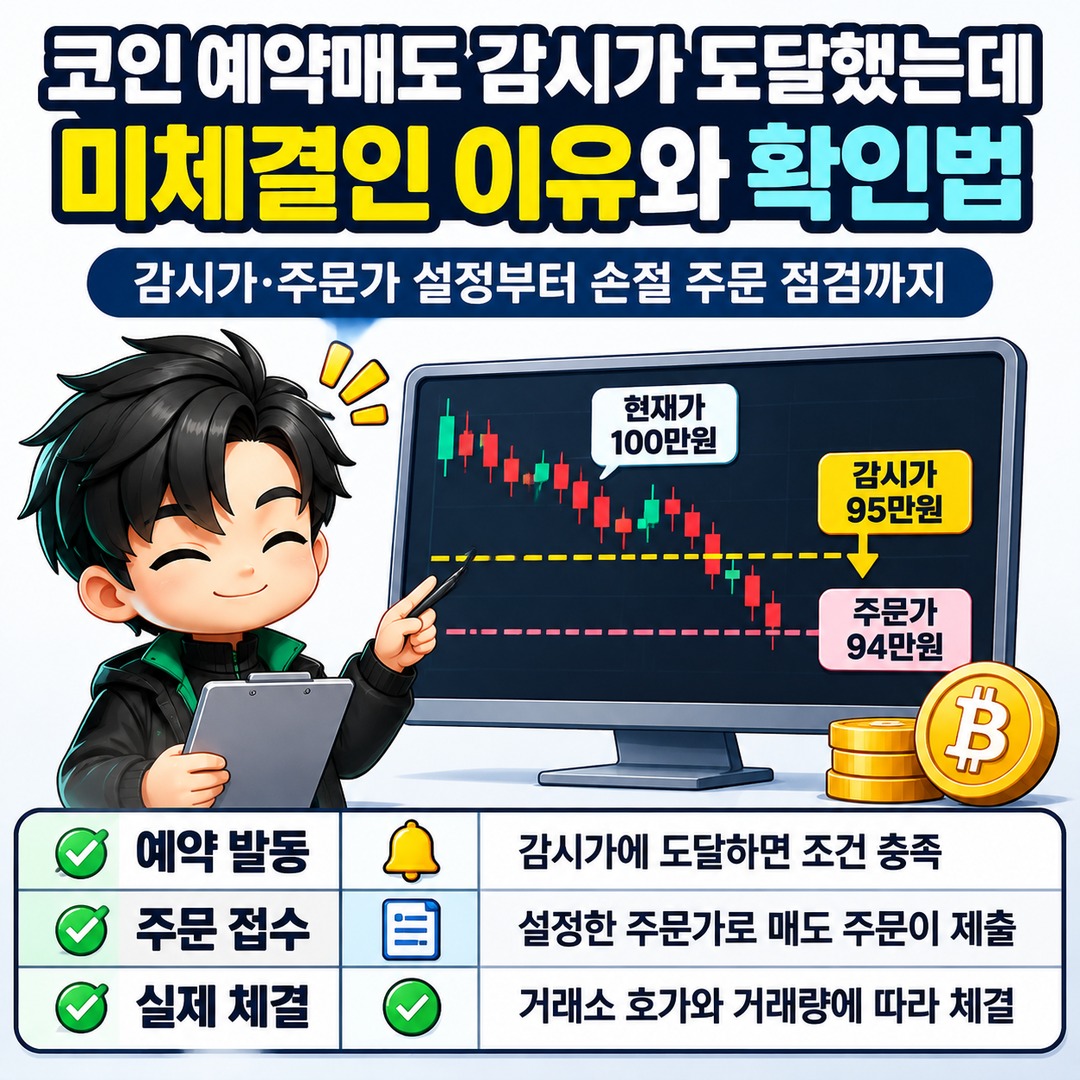
A crypto sell reservation does not automatically complete a sale when the trigger price is reached. Once the trigger condition is met, a sell order is submitted at the specified order price, while actual execution takes place separately depending on the exchange's bid prices and trading volume. Therefore, resolving an unfilled stop-loss order requires distinguishing between trigger activation, order submission, and actual execution.
Based on 2026-11-26, a comparison of the official customer support guidance from Upbit, Bithumb, and Coinone shows that the first thing to check with a reserved sell order is the difference between the trigger price and the order price. During a sharp market decline in particular, the market price may fall below the specified order price even after the trigger condition is met, leaving the sell order pending.
A Reserved Sell Order Does Not Execute the Moment the Trigger Price Is Reached
A reserved sell order monitors a preset price condition and submits a sell order to the exchange once that condition is met.
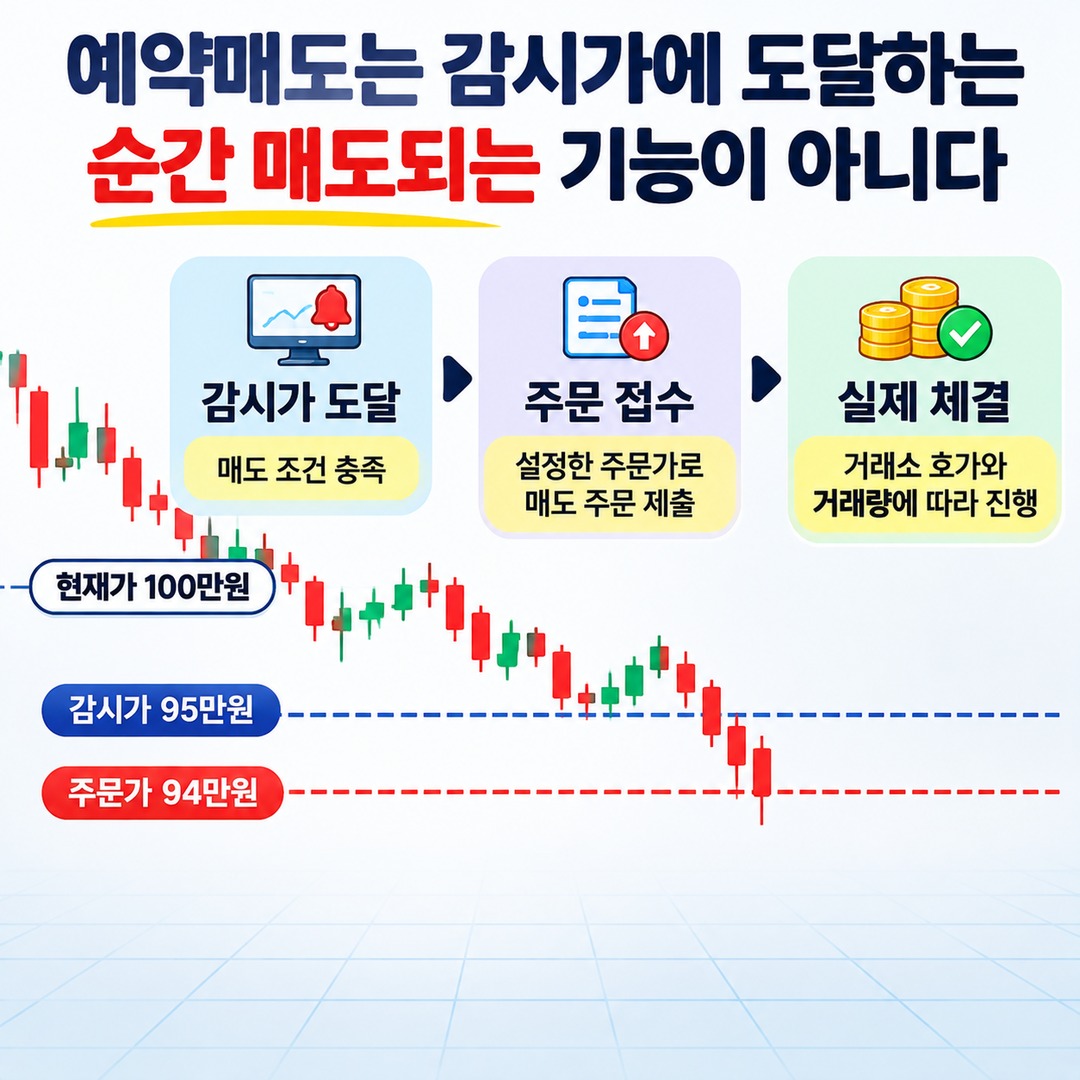
The two prices serve different purposes.
Trigger price: The reference price that activates the automatic sell order
Order price: The price at which the actual sell order is submitted after the trigger condition is met
For example, suppose the current price of a cryptocurrency is KRW 1,000,000, with the trigger price set at KRW 950,000 and the order price set at KRW 940,000.
When the price falls to KRW 950,000, the trigger condition is met. The exchange then receives a limit sell order at KRW 940,000.
However, if the market's bid prices are lower than KRW 940,000, the order may not execute immediately.
In other words, the fact that the price has crossed the KRW 950,000 trigger price does not mean that a sale at KRW 940,000 was possible.
Upbit's Customer Support guide to digital asset trading and Bithumb's guide to automatic orders (Stop-Limit) both explain that a separate order is submitted after the trigger price is reached.
5 Common Situations Where a Sell Order Remains Unfilled Even After the Trigger Price Is Reached
Situations in which a reserved sell order appears not to have been executed generally fall into two categories: the trigger condition was never met, or the trigger condition was met but the subsequent limit order was not filled.
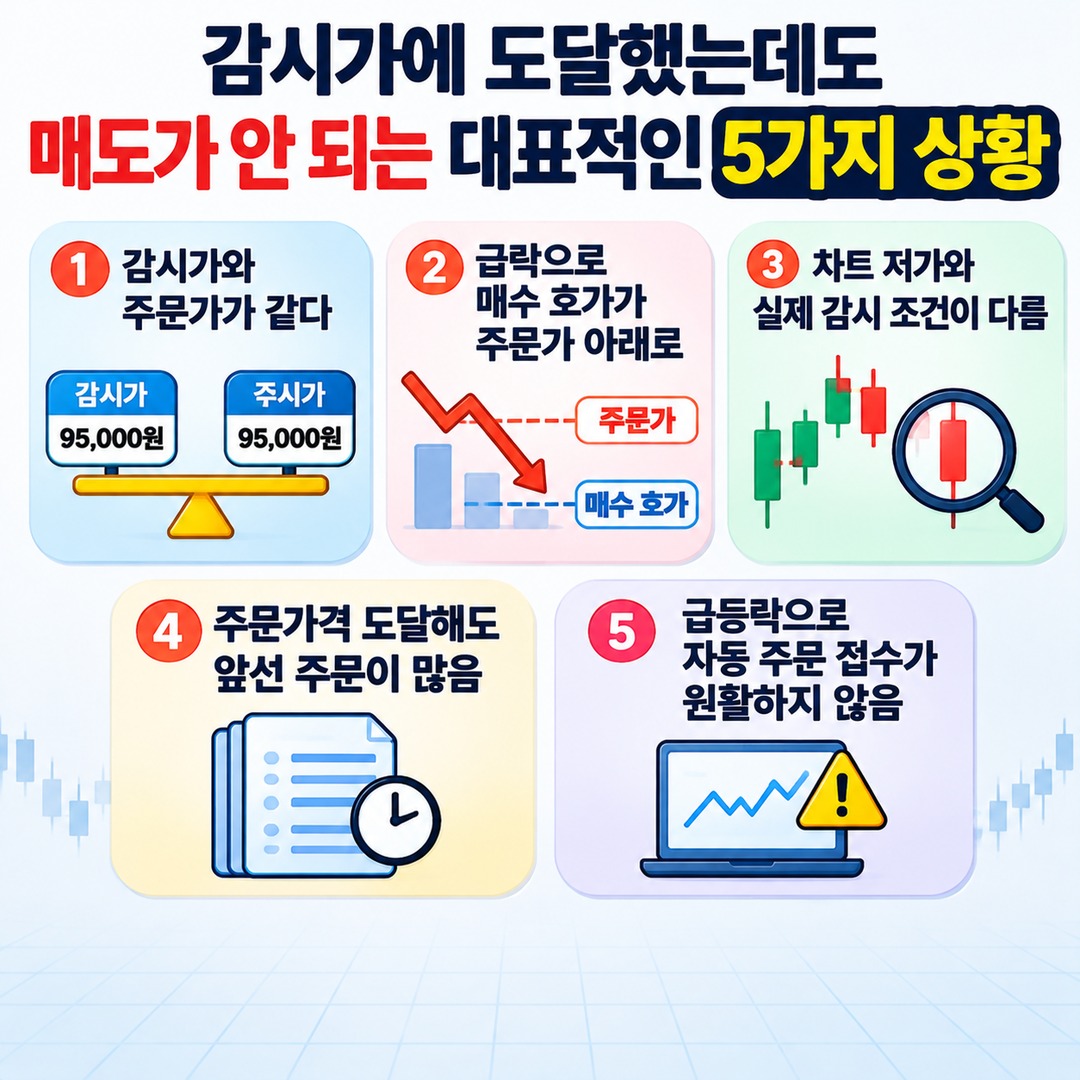
1. The Trigger Price and Order Price Were Set to the Same Level
This is the first thing to check.
When the trigger price and order price are set to the same level, the sell order is not submitted until after the trigger condition has been met.
Upbit also explains that setting the trigger price and order price to the same level does not guarantee execution when the trigger price is reached.
For example:
| Setting | Price |
|---|---|
| Current price | KRW 100,000 |
| Trigger price | KRW 95,000 |
| Sell order price | KRW 95,000 |
Even if the cryptocurrency price reaches KRW 95,000, if the best bid is KRW 94,800 when the order is submitted, the KRW 95,000 limit sell order may not be filled immediately.
This is because a limit sell order cannot execute at a price lower than the price specified.
2. A Sharp Price Drop Pushes Buy Bids Below the Order Price
This is a particularly important situation to watch for when a stop-loss order remains unfilled.
Consider the following hypothetical example.
Hypothetical Example · Not an Actual Trade
Current price: KRW 100,000
Trigger price: KRW 95,000
Sell order price: KRW 94,000
Best bid immediately after the trigger price is reached: KRW 92,000
When the price reaches the KRW 95,000 trigger level, a KRW 94,000 limit sell order is submitted.
However, if the current best bid is KRW 92,000, there may be no buyers willing to pay KRW 94,000 or more, leaving the order unfilled.
This is an important limitation of reserved sell orders using limit orders.
Even if the price falls sharply past the trigger price, a limit order will not execute at a price less favorable than the one specified.
3. The Chart's Low Price and the Actual Trigger Conditions Are Different
Just because the trigger price appears on a chart does not mean a reserved order will be activated on every exchange.
Upbit explicitly states that it determines whether the trigger price has been reached based on actual execution prices recorded after the reserved order was submitted.
Therefore, the following must be distinguished:
The high and low prices of candlesticks displayed on the chart
The bid and ask prices displayed in the order book
Actual executed prices
The price conditions monitored by the reserved order
For example, even if Bitcoin reaches KRW 95,000,000 on another exchange, that does not automatically satisfy the reserved sell order's trigger conditions for the corresponding market on Upbit.
You must check the actual trade history on the exchange and trading market where the reserved order was placed.
4. The Price Was Reached, but Many Orders Are Ahead in the Queue
There are situations where an order remains unfilled even after the specified order price is actually reached.
Limit orders on exchanges are executed according to price-time priority.
According to Upbit's official trading guide, when orders are submitted at the same price, the order received first takes priority.
For example, suppose a sell order is submitted at KRW 95,000.
Sell volume queued ahead of my order: 500 units
Buy volume executed at that price: 100 units
My order: Pending
This is a hypothetical example provided to explain the mechanism.
Even if the price briefly moves to KRW 95,000, my order may remain unfilled if the orders ahead of it have not all been processed.
Therefore, simply checking whether the order price appeared on the chart is not enough to determine whether the order was actually executed.
5. Sharp Price Fluctuations Prevented the Automatic Order from Being Submitted Successfully
If the order does not turn into a regular unfilled order even after the trigger price is reached, you should check its order submission status.
In its official Stop-Limit automatic order guide, Bithumb explains that automatic orders may fail to be submitted during sharp price fluctuations or sudden surges in trading volume.
It also states that automatic orders for cryptocurrencies undergoing a hard fork or swap may be canceled.
As these examples show, reserved sell orders do not guarantee order submission or execution under all market conditions.
How Should You Set the Trigger Price and Order Price for a Stop-Loss Sell Reservation?
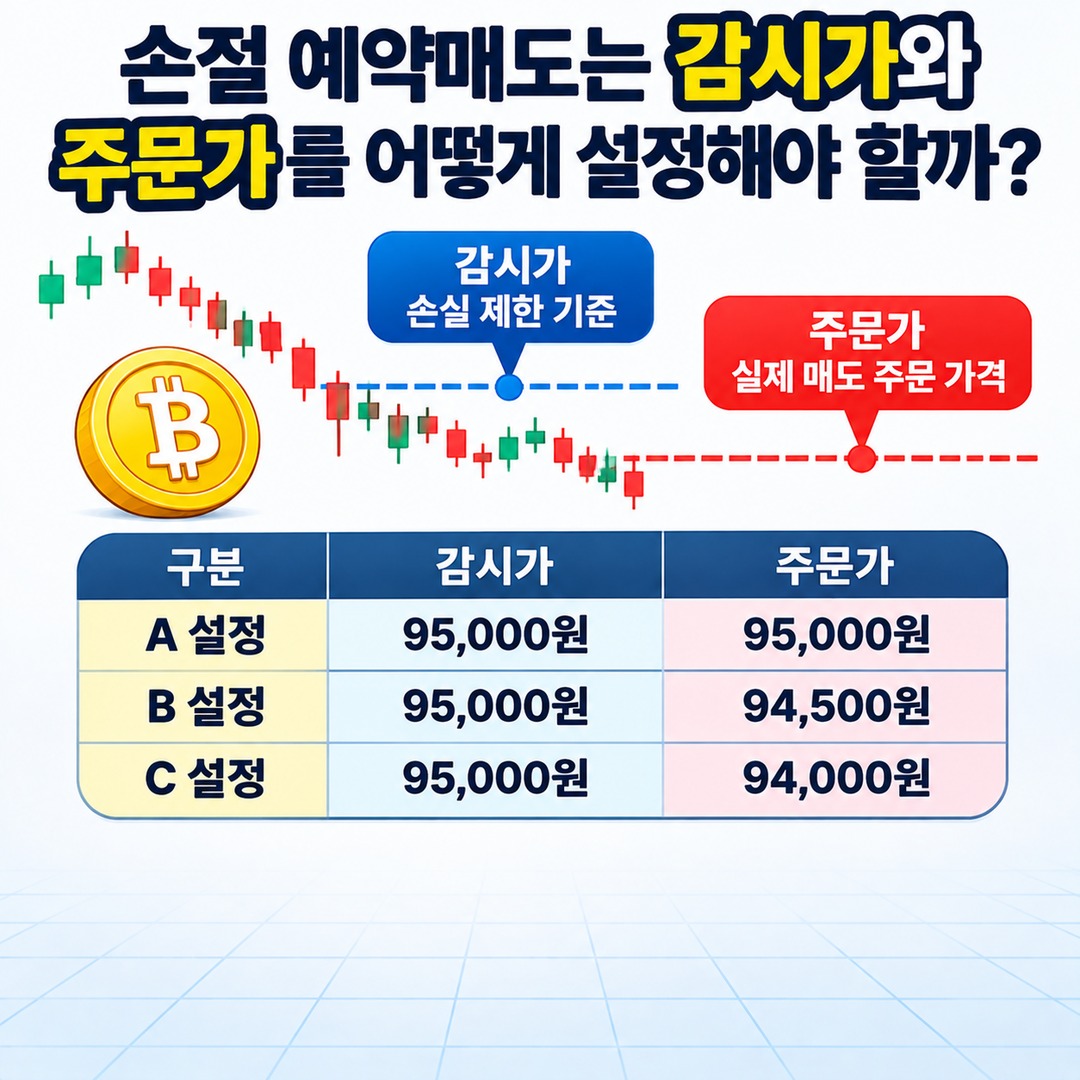
For stop-loss purposes, set the trigger price as your loss-limit threshold. Then determine the order price based on how far below the trigger price you are willing to go when attempting to sell after the trigger is reached.
In particular, setting the sell order price below the trigger price can widen the range of prices at which execution is possible, in exchange for accepting some additional price decline.
The following is a hypothetical example.
Hypothetical Example · Reference values are assumptions for illustrative purposes
| Category | Trigger Price | Order Price |
|---|---|---|
| Setting A | KRW 95,000 | KRW 95,000 |
| Setting B | KRW 95,000 | KRW 94,500 |
| Setting C | KRW 95,000 | KRW 94,000 |
The difference between the three settings is the minimum acceptable selling price.
Setting A means the order will not sell below KRW 95,000.
Setting B allows the selling price to be lowered as far as KRW 94,500.
Setting C allows the selling price to be lowered as far as KRW 94,000.
Once the trigger condition is met, the order may be filled if buy bids are available at or above the respective order price.
However, lowering the order price does not guarantee execution.
For example, if the market price drops sharply to KRW 92,000, all three settings—A, B, and C—may remain unfilled.
Author's Calculation
The difference between Setting B's trigger price and order price is calculated as follows.
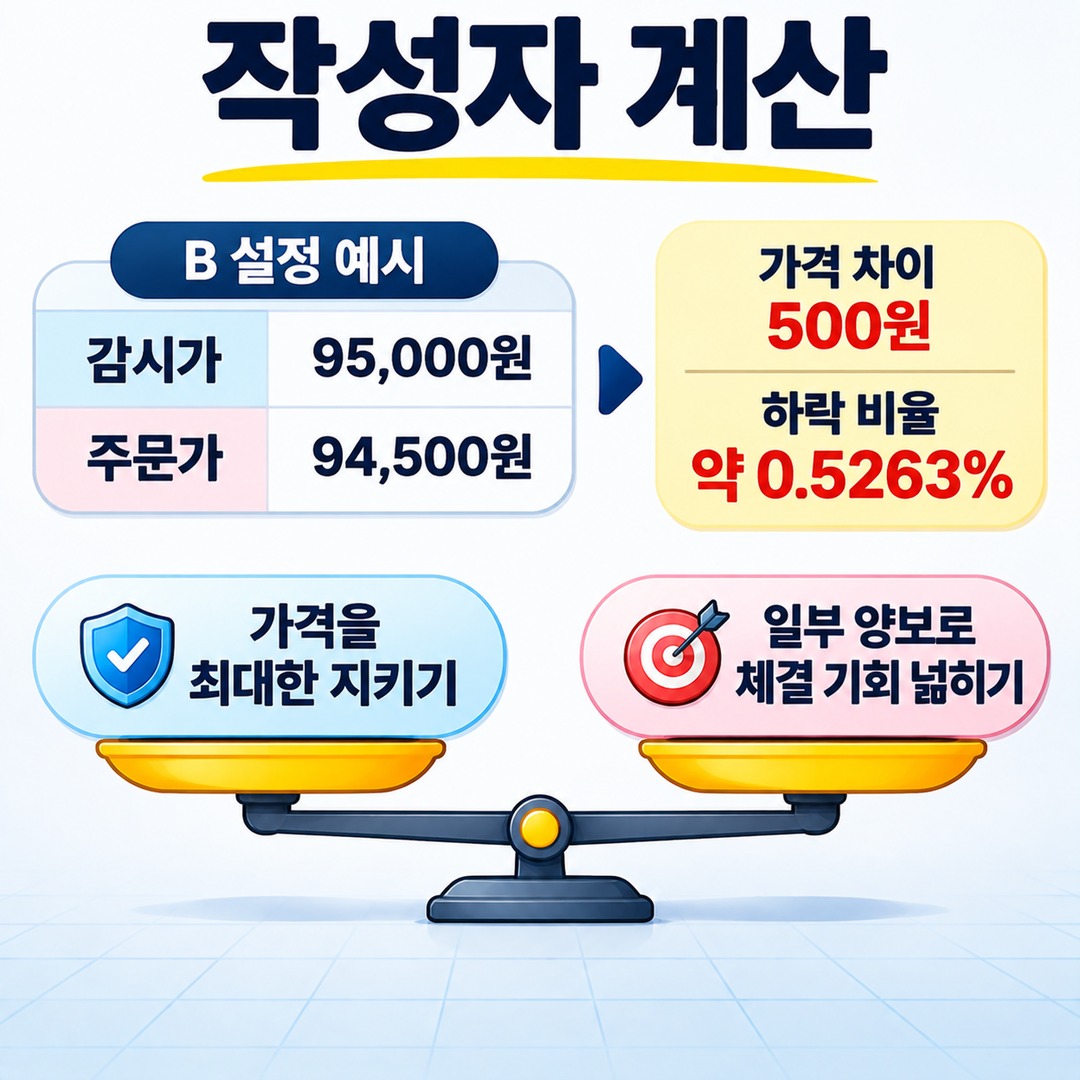
95,000−94,500=KRW 50050095,000×100≈0.5263%In other words, this is a hypothetical example in which the sell order's minimum price is set approximately 0.5263% below the trigger price.
These figures do not represent an actual optimal order-price gap or the probability of execution.
Is Lowering the Order Price Always Better?
No, not necessarily.
Lowering the order price expands the range of lower buy bids against which the order can execute, but it may also result in a less favorable actual selling price.
Conversely, setting the order price close to the trigger price helps protect the selling price, but means accepting a higher risk of the order remaining unfilled during a sharp market decline.
Therefore, configuring the order requires deciding which of the following two priorities matters more:
Preserving the price as much as possible
Expanding the opportunity for execution, even if it means accepting a somewhat lower price
A reserved limit sell order cannot guarantee both at the same time.
With Upbit Reserved Sell Orders, You Must Also Check the Trigger Direction
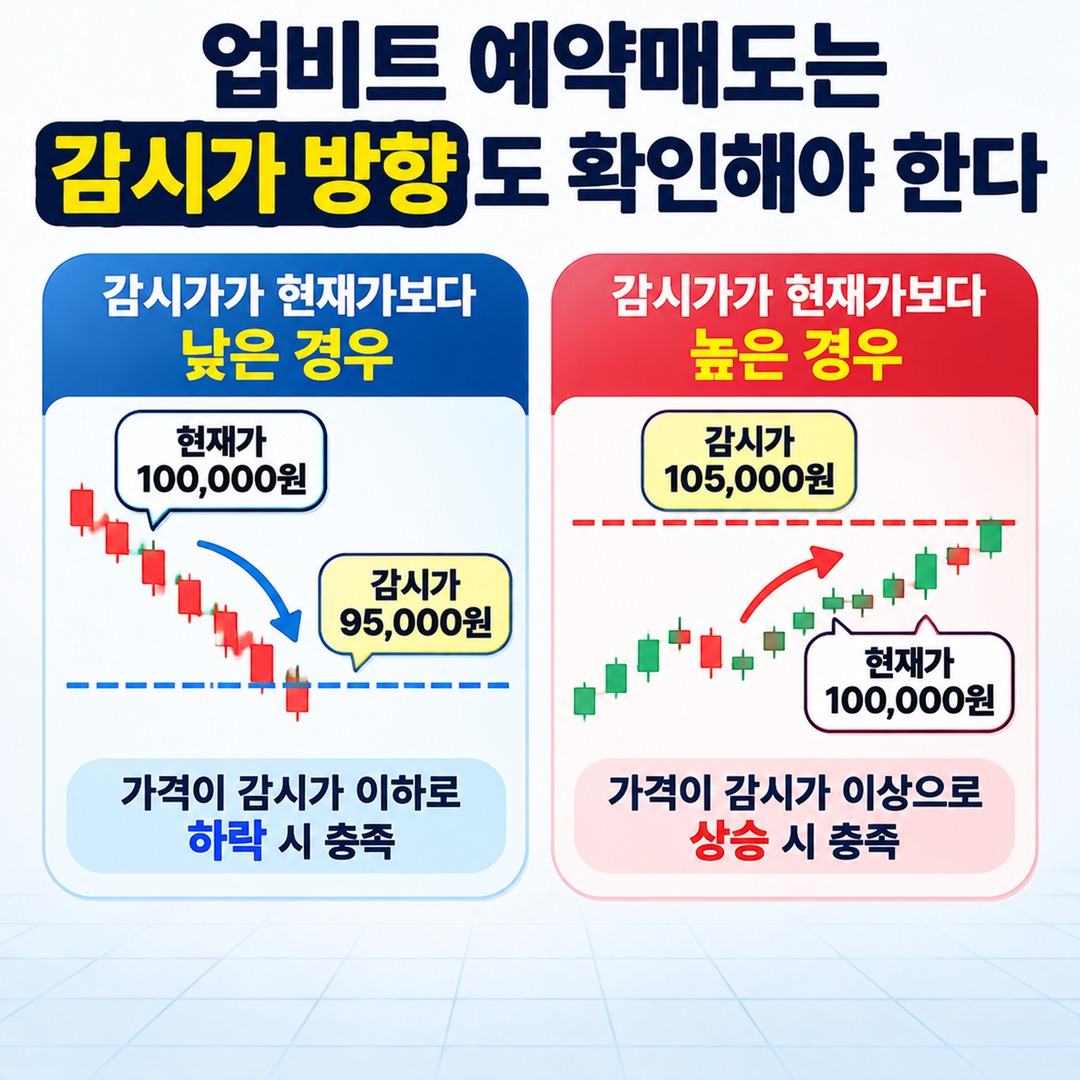
Upbit determines the trigger direction by comparing the current price with the trigger price when the reserved order is registered.
This is important when setting up a reserved stop-loss sell order.
The conditions specified in Upbit's official mobile trading guide are as follows.
| Condition When Registered | Subsequent Trigger Condition |
|---|---|
| Trigger price is below the current price | Price falls to or below the trigger price |
| Trigger price is above the current price | Price rises to or above the trigger price |
For example, if the current price is KRW 100,000 and the stop-loss trigger price is set at KRW 95,000, the trigger condition will be met if the price subsequently falls to or below KRW 95,000.
Conversely, if the current price is KRW 100,000 and the trigger price is set at KRW 105,000, the order is designed to activate if the price subsequently rises to or above KRW 105,000.
An important point to remember is that the order monitors execution prices recorded after registration, not price movements that occurred before the reserved order was placed.
Therefore, if you register a reserved sell order after the price has already fallen below the trigger price, it may not activate under the stop-loss conditions you intended.
How Do Reserved Sell Order Features Differ Across Exchanges?
Although the term reserved sell order is similar across platforms, the feature names and conditions described by each exchange differ.
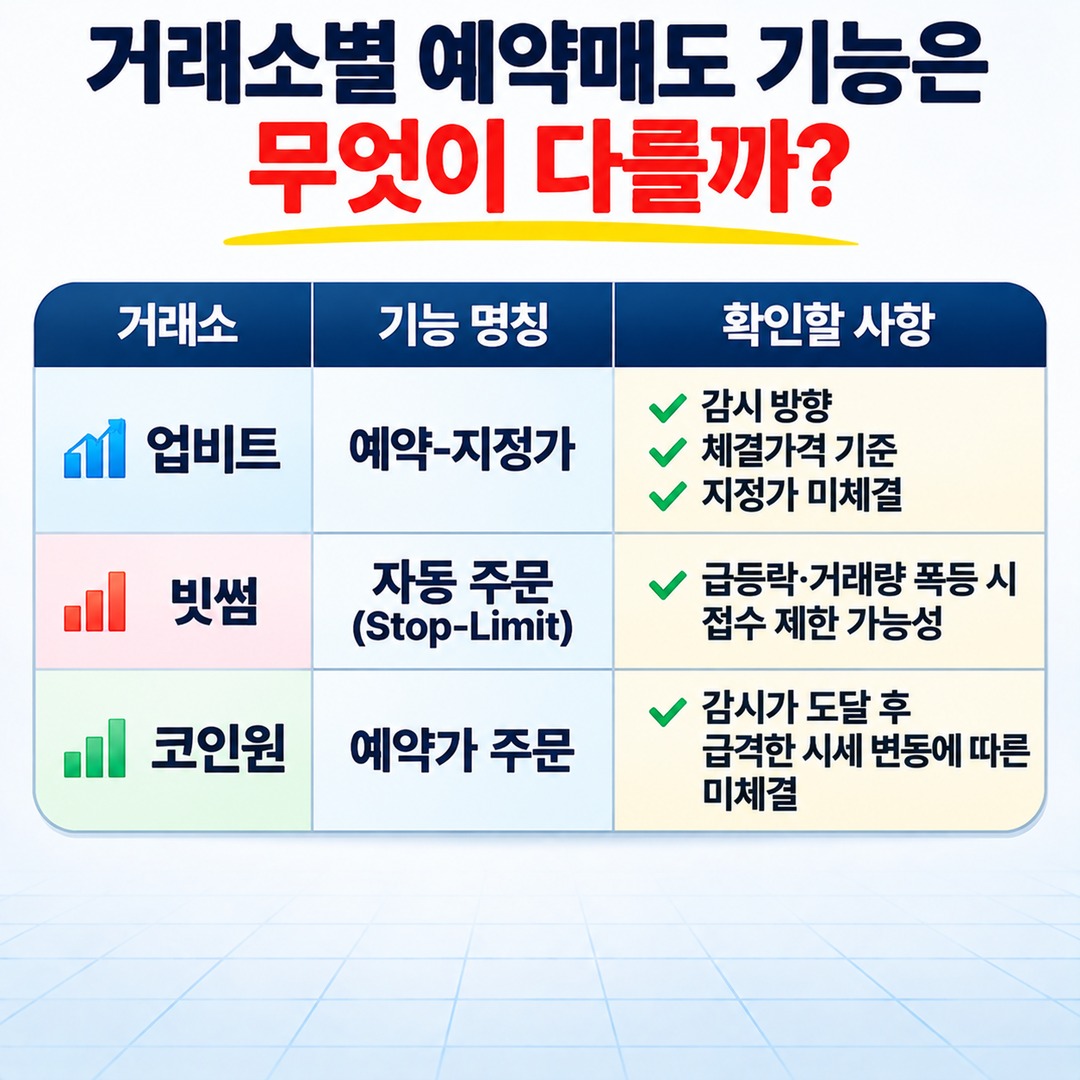
| Exchange | Feature Name | What to Check |
|---|---|---|
| Upbit | Reserved Limit Order | Trigger direction, execution price criteria, and unfilled limit orders |
| Bithumb | Automatic Order (Stop-Limit) | Possibility of order submission restrictions during sharp price fluctuations or surges in trading volume |
| Coinone | Reserved Price Order | Unfilled orders caused by sudden market price movements after the trigger price is reached |
Coinone's guide to order methods by order type also explains that even if an order is triggered when the trigger price is reached, rapid market price fluctuations may prevent execution at the specified price.
Therefore, you should not apply another exchange's order settings without checking their specific rules.
In particular, it is important not to assume that Upbit's trigger conditions are identical to those used by Bithumb or Coinone.
How to Check Whether a Reserved Sell Order Has Been Triggered
To determine whether a reserved sell order has been activated, checking the order history is more reliable than relying on the chart alone.
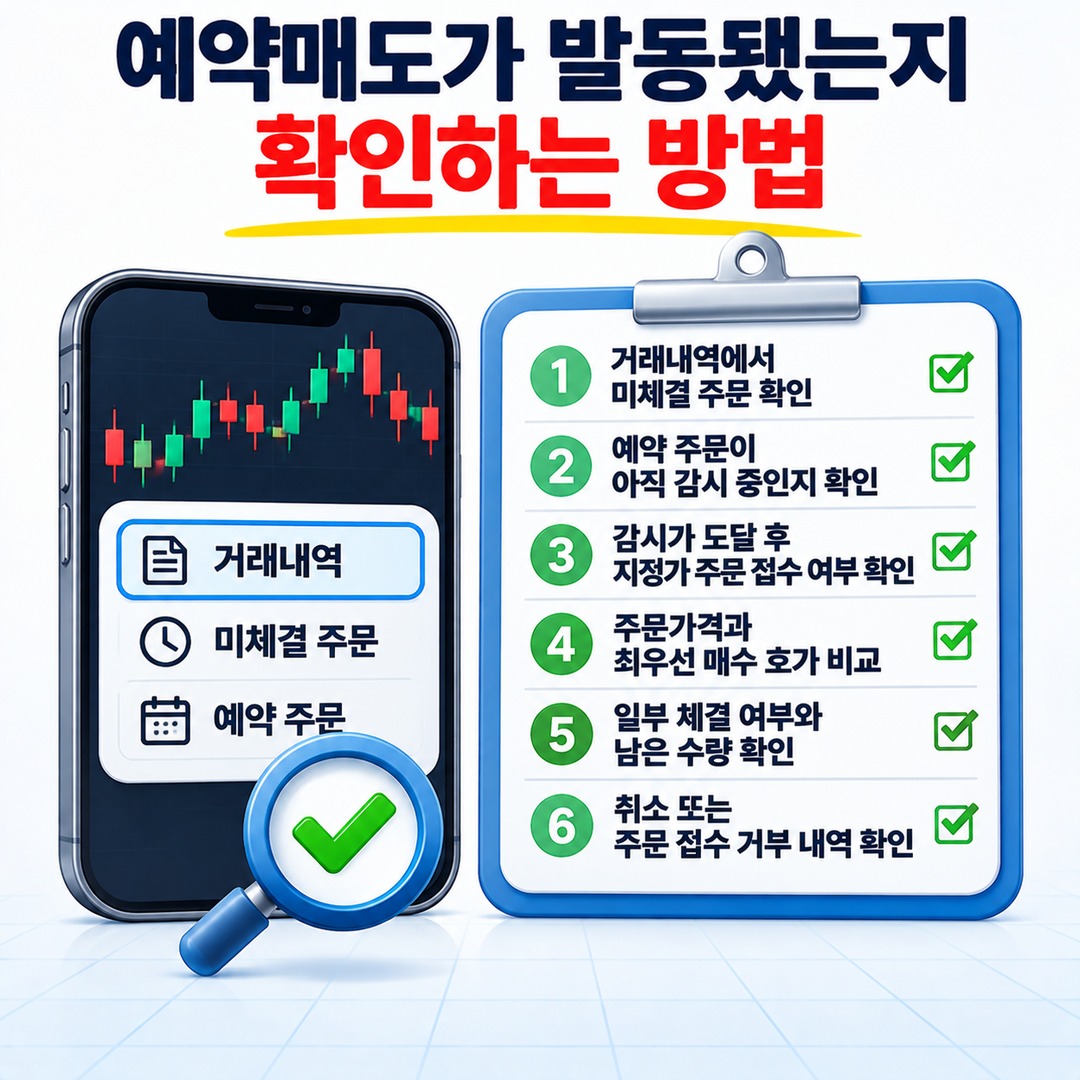
If you are using the Upbit mobile app, follow these steps:
1. Check your unfilled orders in the transaction history.
2. Check whether the reserved order is still being monitored.
3. Check whether a limit order was submitted after the trigger price was reached.
4. Compare the order price with the best available bid at the time.
5. Check whether the order was partially filled and whether any quantity remains.
6. Check whether there is a record of cancellation or rejected order submission.
According to Upbit's guidance on handling unfilled orders, an unfilled order may remain open depending on its price conditions and time priority. By default, it stays active until the user cancels it manually. However, exceptions apply, including maintenance periods and trading restrictions.
On Upbit, when a reserved order is set up, the assets required for that order are classified as pending order assets. As a result, the available quantity may appear insufficient when you try to place another order using the same assets.
What to Watch Out for When Replacing an Unfilled Order
Before canceling an unfilled order or changing its price, check the current order book.
A market order gives you less control over the execution price than placing another limit order. For cryptocurrencies with low trading volume or those experiencing a sharp decline, the actual execution price of a market order can vary significantly.
Conversely, a new limit order gives you control over the price, but it may remain unfilled again.
In particular, the price may move further while you are canceling the existing order and placing a new one, so you should also account for price changes between cancellation and resubmission.
Final Checklist to Reduce Unfilled Reserved Stop-Loss Sell Orders
If you have set up a reserved stop-loss sell order, it is a good idea to check the following:
Is the relationship between the current price and the trigger price set in the correct direction?
Do you understand the difference between the trigger price and the sell order price?
Is the order price excessively high compared with the actual buy bids?
Have you checked the trading volume and available bid depth for the cryptocurrency?
Was the reserved order actually submitted successfully?
Did the order convert into a regular order after the trigger price was reached?
Is there any partially filled order or remaining unfilled quantity?
Has the exchange announced maintenance, changes to trading support, or order restrictions?
The most important point is not to assume that your stop-loss has been completed simply because the reserved sell order was successfully submitted after you set it up.
A reserved sell order is a tool that automatically submits an order when specified conditions are met. It is not a guarantee that your assets will be sold at a particular price, even during a sharp market decline.
To identify why a stop-loss order remains unfilled, you must check separately whether the trigger price was activated, whether the order at the specified price was submitted, and whether the trade was actually executed.
※ This article is for informational purposes only to help readers understand market movements. It is not an investment recommendation for any specific cryptocurrency or asset. All final decisions and investment risks are your own responsibility.