

Why a Stock Stop-Loss Order Was Triggered but Not Filled: The Stop Price and Actual Sale Price Are Different
This post contains Coupang Partners affiliate links. We may earn a commission from qualifying purchases.
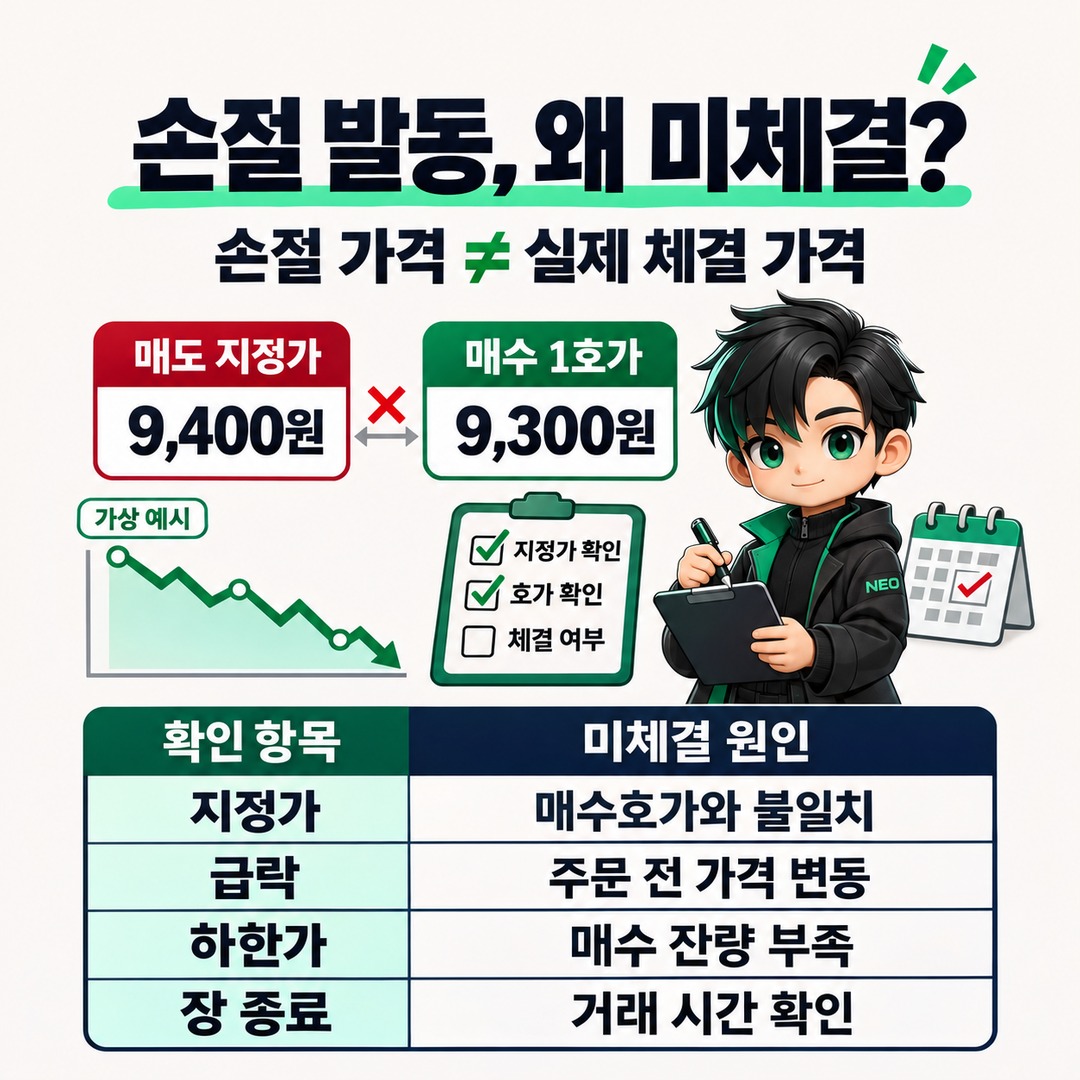
A stock stop-loss order does not necessarily sell at the price you set just because the stock reaches it. After the brokerage’s automatic monitoring condition is met, the actual sell order must be sent to the exchange and matched with a buy order at a compatible price. A sharp drop, sell orders queued at the lower price limit, limit-price settings, and market close are key factors to check when a stop-loss order remains unfilled.
Reference date: 2026-11-18 Korea Standard Time
5 reasons a sale may not be completed even after the stop price is reached
1. The stop condition is met, but the limit order price does not match the available buy price
The first thing to check is the price of the sell order that was actually submitted, not the stop condition.
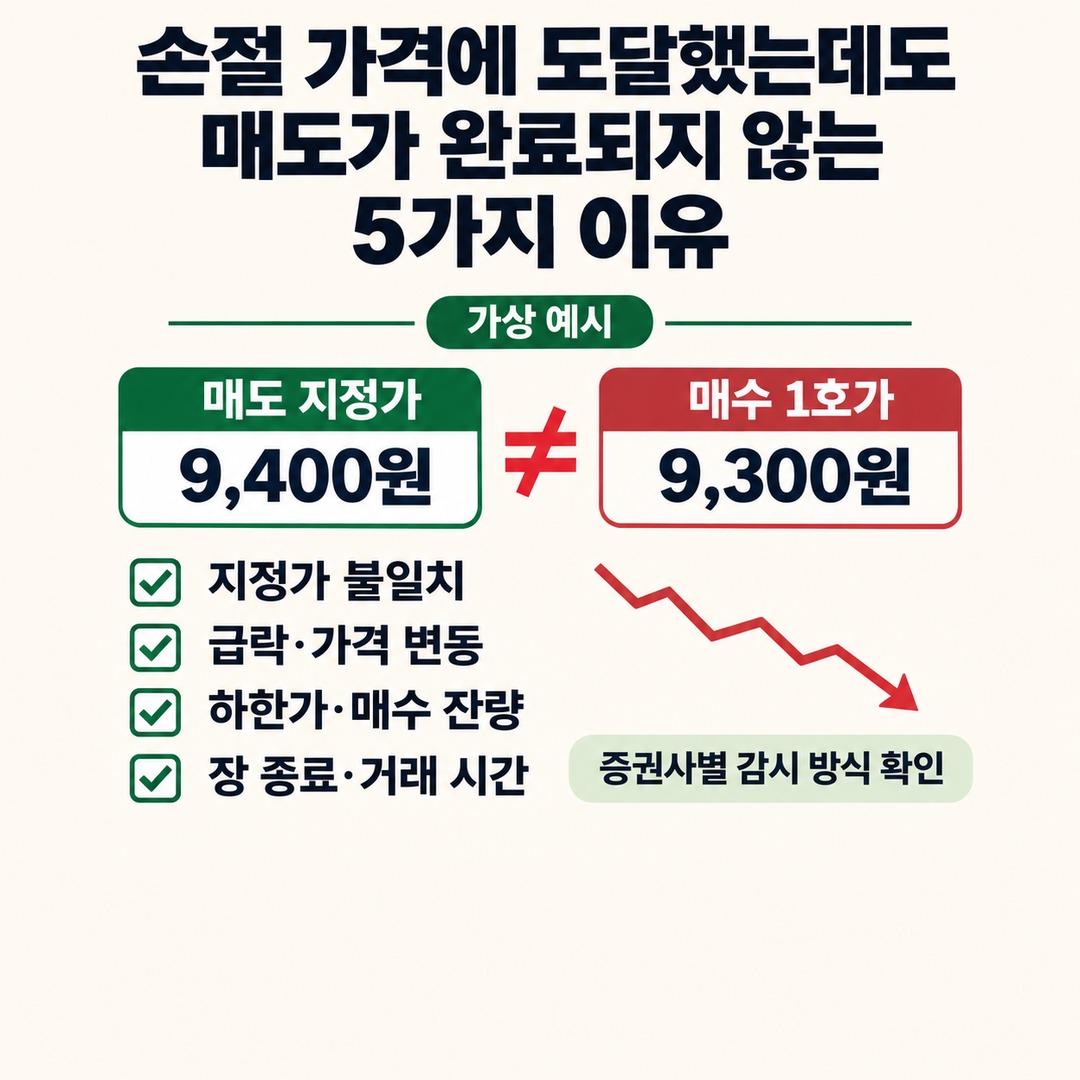
When the stop condition is met, an automatic stop-loss order submits a sell order using the order type you set in advance. If it is a limit sell order, it will be filled only if a buyer places an order to buy at that price or higher.
For example, consider the following hypothetical situation.
Hypothetical example · This is not a trading example involving an actual stock.
| Category | Price |
|---|---|
| Average purchase price of shares held | KRW 10,000 |
| Stop-loss trigger price | KRW 9,500 |
| Limit price for the sell order after the stop is triggered | KRW 9,400 |
| Current buy 1 quote | KRW 9,300 |
At this point, the KRW 9,400 limit sell order is not filled immediately.
The seller is asking KRW 9,400, while the highest price offered by a buyer is KRW 9,300.
The fact that the stock price has fallen below the stop price does not mean the sell order can be filled.
Under the Korea Exchange’s trade execution rules, a limit sell order can be filled at the specified price or higher. It cannot be filled below the specified price.
You can find related information in the Korea Exchange’s Trading System for the Stock Market.
2. The stock price dropped sharply and skipped past the stop price
The second situation is when the stock price falls past the stop threshold too quickly.
A stop price of KRW 10,000 does not guarantee that a buyer will appear at KRW 10,000.
For example, if the stock price plunges from KRW 10,000 to KRW 9,500, the following situation may occur.
The stop-loss monitoring condition is met at KRW 10,000
By the time the actual order is created, the stock price has fallen to KRW 9,500
The sell order is submitted according to the price conditions that were set
If there are not enough pending buy orders, some or all of the order may remain unfilled
Kiwoom Securities’ official guide to using its Stock StopLoss service also notes that rapid price changes and concentrated order activity can cause delays or omissions in quote transmission, orders not being processed, and orders remaining unfilled.
It also explains that there may be a gap between when the monitoring condition is met and when the actual order price is checked again.
So do not assume that a sell order was filled at the stop price just because that price appeared on the chart.
3. Sell orders are queued at the lower price limit, but there are no buyers
The third situation is when the stock hits the lower price limit.
In the domestic regular stock market, the daily price limit is 30% above or below the reference price. Exceptions apply depending on the type of security and trading system.
Even when a stock hits the lower price limit, there may not be enough buy orders to absorb all the sell orders.
In this situation, submitting a market sell order does not guarantee that the sale will be completed.
A market order does not specify a price; it seeks an available counterparty order to execute against. If there are no buy orders on the other side, it cannot be filled.
The Korea Exchange’s explanation of its trading system also says that market orders have no price limit, but prices can fluctuate sharply if there are not enough orders on the other side.
These points need to be distinguished:
Hitting the lower price limit: The stock has reached the bottom of its permitted trading range.
A sell order at the lower price limit: An order to sell at that price has been submitted.
A fill at the lower price limit: A trade has been completed against an actual buy order.
These three things do not mean the same thing.
If the queue of sell orders at the lower price limit keeps growing, the stock may remain unsold even after the stop-loss order is triggered.
4. The remaining shares are not automatically reordered after the stop-loss monitoring triggers once
This point deserves particular attention.
Automatic monitoring orders work differently depending on the brokerage.
Korea Investment & Securities’ guide to its Stock StopLoss service states that once a condition is met and an order is sent, server monitoring ends. It also states that no additional automatic order is placed for the remaining shares if only part of the order is filled.
For example:
An example of how the system works, as described in Korea Investment & Securities’ official help guide
Stop-loss order settings
Trigger price
KRW 10,000
Sell order quantity
Actual result after the condition is met for 5,000 shares
Quantity filled
1,000 shares
Unfilled quantity
4,000 shares remain; no additional automatic order may be placed for the remaining 4,000 shares.
This is a specific server-based automatic order method described in the brokerage’s official help guide; it does not apply in the same way to every brokerage.
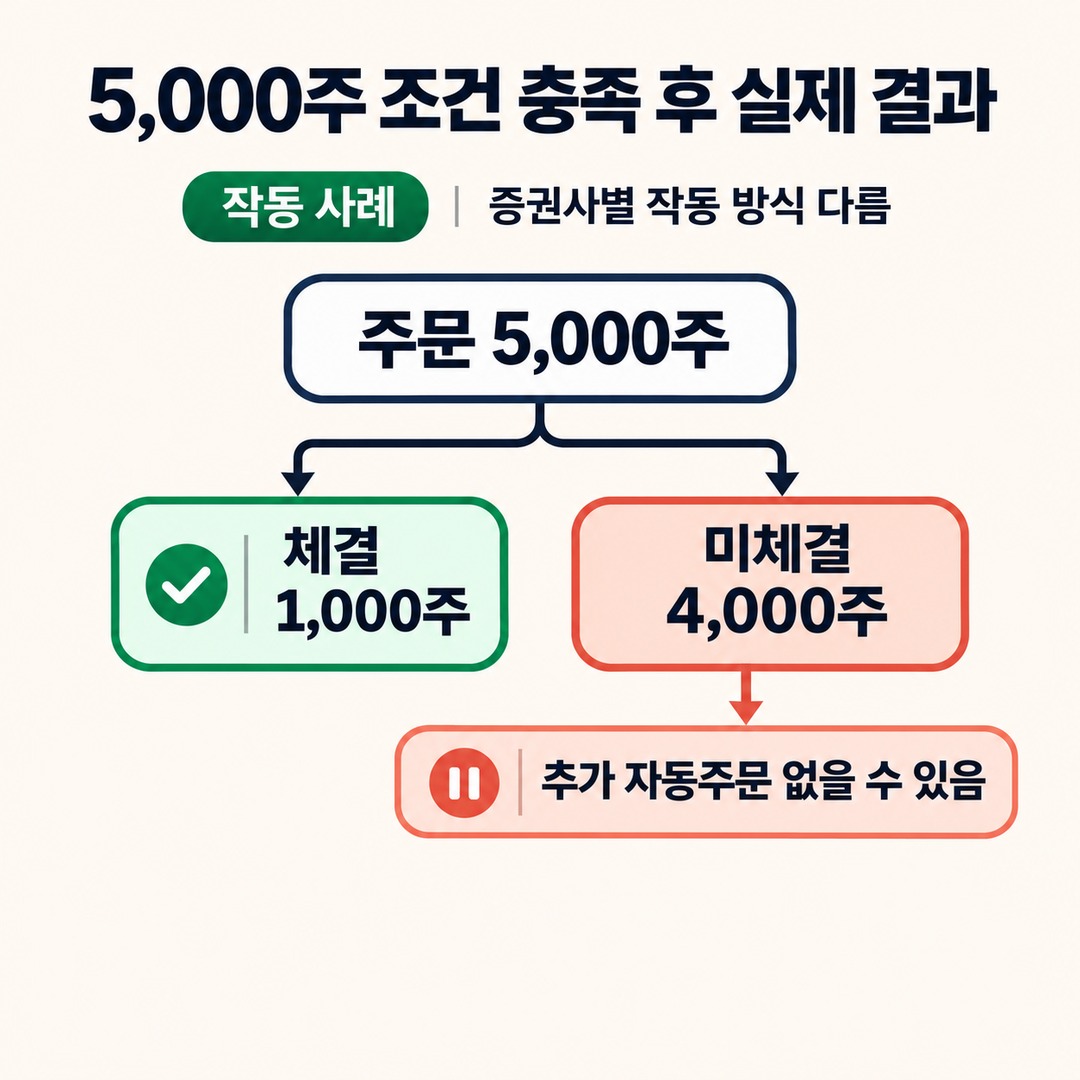
In other words, even if you set the stop-loss monitoring period to 30 days, the remaining shares are not automatically sold on an ongoing basis after the order is triggered once.
You can confirm this operating method in Korea Investment & Securities’ guide to its Stock StopLoss service.
5. There is a problem with the order quantity or exchange settings
Even if the stop condition is met, the order itself may be rejected.
Check these common issues:
The sellable quantity is insufficient because a sell order was already submitted through another screen
An existing unfilled liquidation order remains open
A counterparty quote or best quote was specified, but that quote is unavailable when the order is placed
The automatic order cannot be sent because, for example, the order password was changed
The order was set to manual, but the order was not confirmed
The selected exchange does not match the market where the order can actually be placed
Kiwoom Securities notes that a stop-loss order may be rejected if an unfilled liquidation order already exists and there is no additional quantity available for liquidation.
Korea Investment & Securities also explains that an order may be rejected if you set 3 counterparty quote levels but only 2 counterparty quotes are available when the order is placed.
An order being rejected is different from an order being accepted but left unfilled.
You need to distinguish between these two statuses because the solutions differ.
Check in this order to find the reason an order remains unfilled
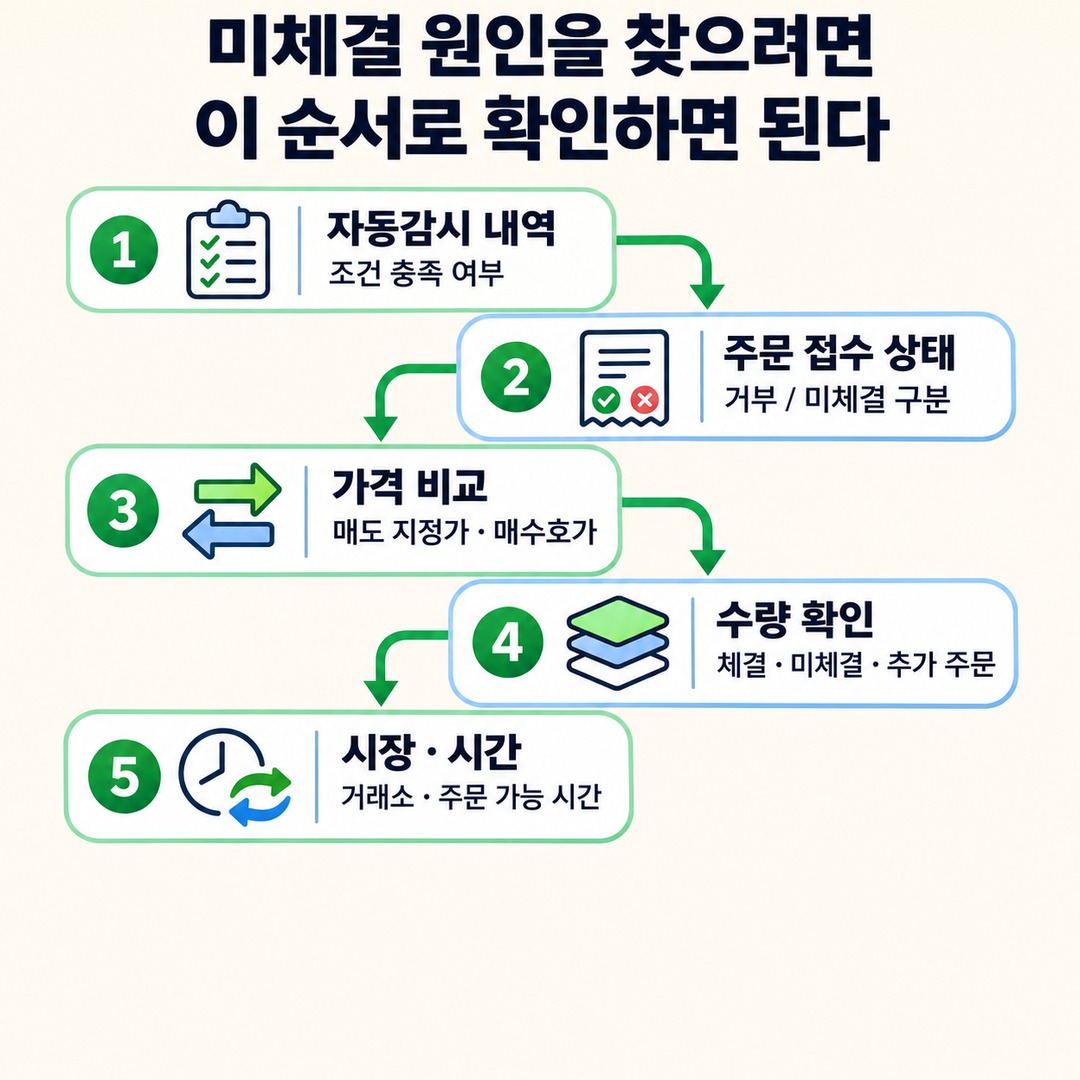
If a stop-loss order is triggered but the shares are not sold, check the order history first instead of changing the stop price right away.
Step 1: Check whether the condition was met in the automatic monitoring history
First, check whether the stop-loss monitoring condition was actually met.
Monitoring
Condition met
Order sent
Order rejected
Order completed
Depending on the brokerage, the status shown on screen may not update in real time.
Korea Investment & Securities’ help guide also notes that if you do not press the refresh button, an order that has already been executed may still appear as being monitored.
Step 2: Check whether the actual sell order was accepted
Distinguish between these two statuses in the order history:
| Status | Meaning |
|---|---|
| Order rejected | The sell order itself was not accepted successfully |
| Unfilled | The sell order was accepted, but no trade was completed |
If the order was rejected, check the reason for rejection.
If it remains unfilled, compare the order price with the current buy price.
Step 3: Compare the sell limit price with the buy price
If the sell order is a limit order, first check the 1 buy quote.
For example, if the sell order price is KRW 9,500 and the 1 buy quote is KRW 9,400, the order may not be filled immediately.
Conversely, if the 1 buy quote is KRW 9,600, the price condition is met, but only part of the order may be filled depending on the order quantity, available quantity at that price, and submission sequence.
Step 4: Check the unfilled quantity and whether additional orders will be placed
A partial fill does not mean the remaining quantity will automatically be processed.
Check the following:
1. Original order quantity
2. Cumulative filled quantity
3. Current unfilled quantity
4. Validity status of the unfilled order
5. Whether an additional automatic order was placed
If you sell the same quantity again while the original unfilled order is still active, you could end up with duplicate orders, so check the order status first.
Step 5: Check the exchange and the hours when orders can be placed
Trading conditions can differ by market for Korean stocks, including the Korea Exchange (KRX) and Nextrade (NXT).
Kiwoom Securities’ stop-loss guide distinguishes between the monitoring hours and market-order hours for KRX and NXT.
Kiwoom Securities specifically notes that market orders are allowed only during regular trading hours and may be rejected in the pre-market and after-hours sessions.
So check not only whether the monitoring condition was triggered, but also which exchange the order was submitted to and what type of order it was.
How do order types differ when a stop-loss order is triggered?
When setting a stop-loss order, it matters not only what the trigger price is, but also what type of order will be submitted once the condition is met.
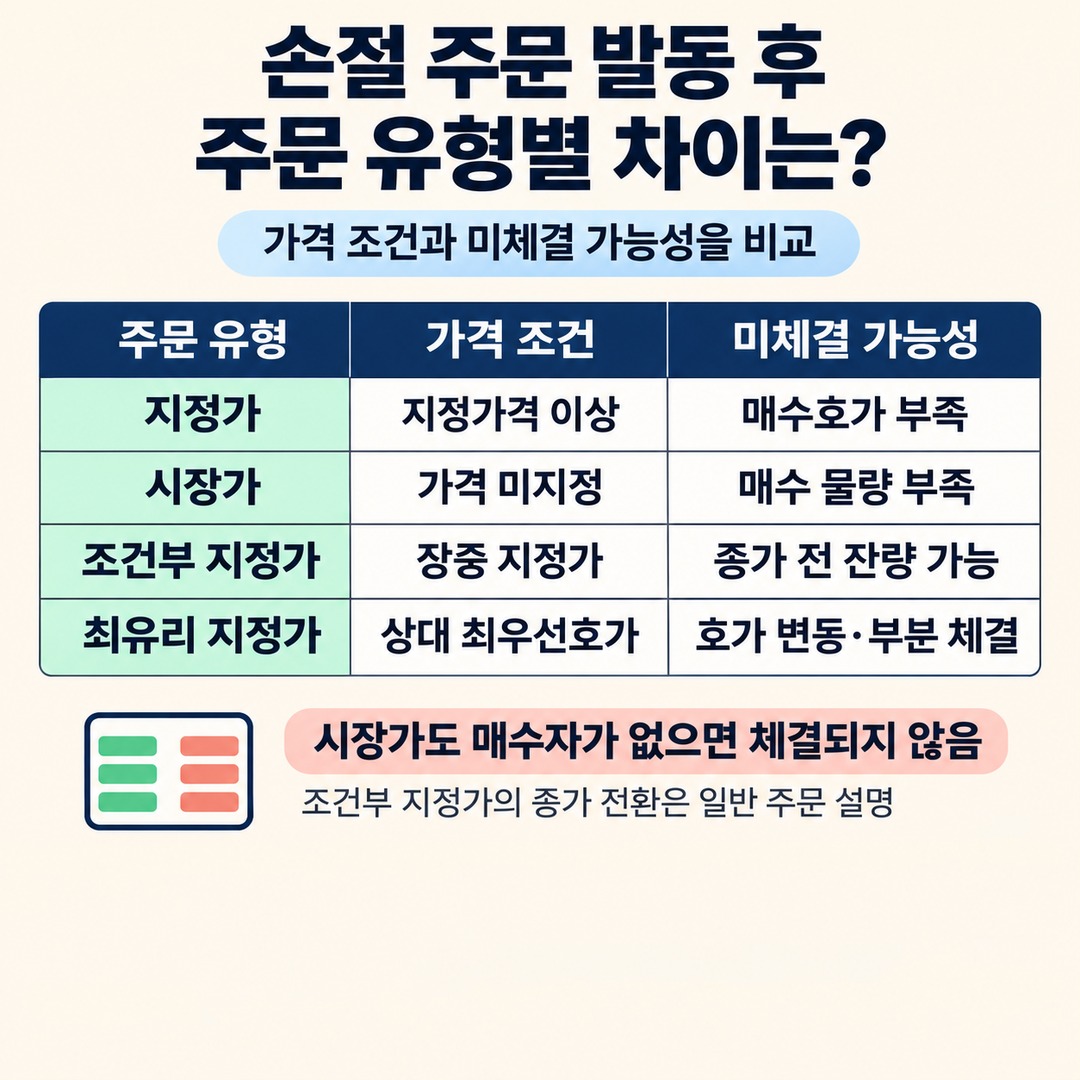
| Order type | Price condition | How it may remain unfilled |
|---|---|---|
| Limit sell order | At or above the specified price | May remain unfilled if there are not enough buy orders at matching prices |
| Market sell order | No price specified | Some quantity may remain if there are not enough buy orders |
| Best-quote limit order | Limit order during the session; any unfilled quantity converts to a market order at the close | May remain unfilled until the conversion |
| Best-counterparty limit order | Based on the counterparty’s best quote | May be partially filled depending on quote changes and available quantity |
The Korea Exchange explains the difference between limit and market orders in terms of whether they restrict the execution price. A market order has more flexible price conditions than a limit order, but it cannot solve the problem of there being no buyers.
For reference, the conversion of unfilled quantity in a best-quote limit order to a market order at the close is part of the Korea Exchange’s general explanation of order types. This does not mean a brokerage’s stop-loss service automatically uses that order type.
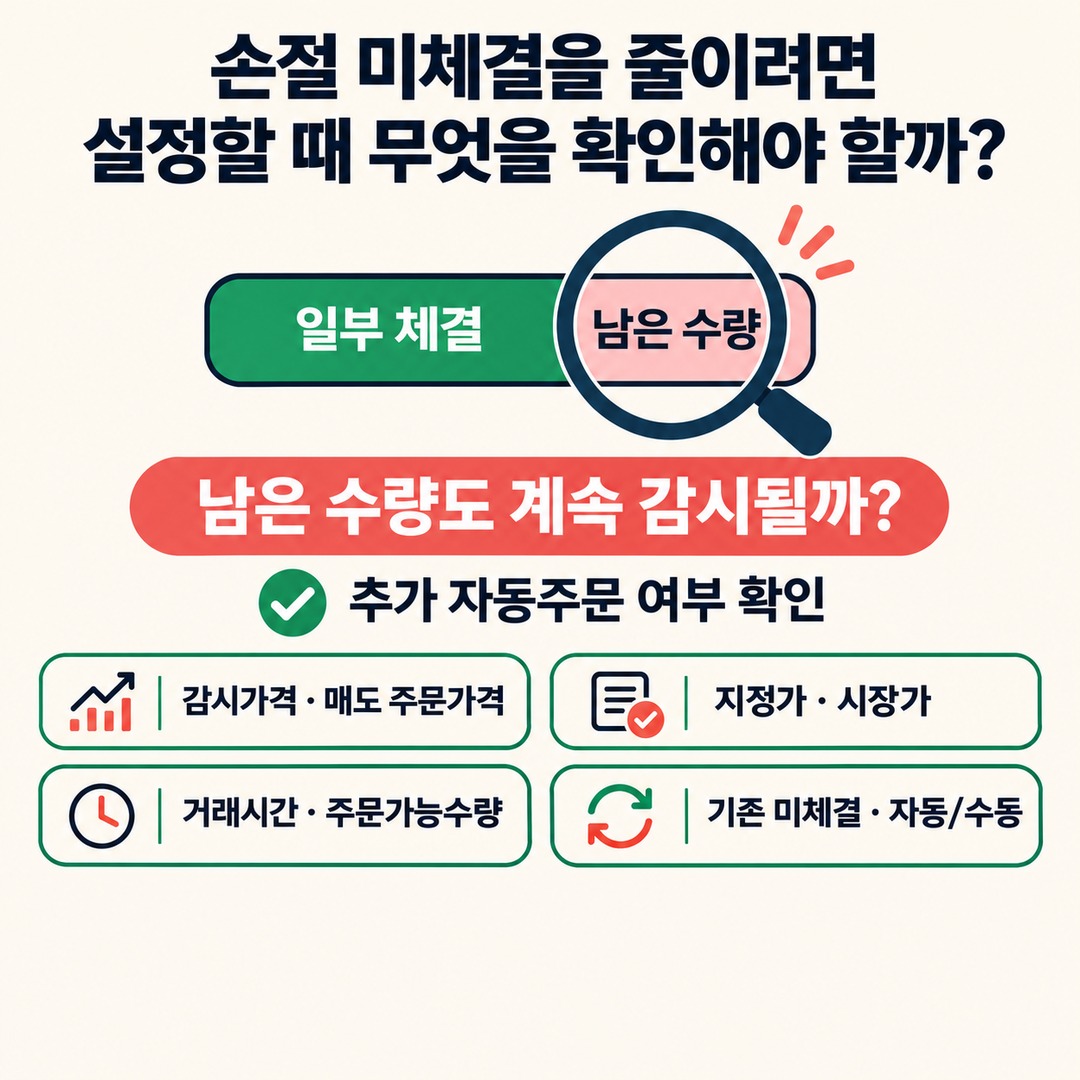
What should you check when setting a stop-loss order to reduce the chance it remains unfilled?
A stop-loss order is a tool for limiting losses; it does not guarantee a sale at the price you want.
It is a good idea to check the following when setting one:
Have you distinguished the stop-loss monitoring price from the actual sell order price?
When the condition is met, will the order be placed as a limit order or a market order?
Is it during trading hours when market orders are allowed?
Have you set the quantity available to order correctly?
Is there already an unfilled sell order?
Will the remaining quantity be reordered automatically after a partial fill?
Does monitoring end once the condition is met?
Is the order set to automatic or manual?
The most important thing to check here is what happens after a partial fill.
Some brokerages submit an order only once after the stop condition is met, so check separately whether the remaining quantity will continue to be monitored.
Frequently asked questions about stop-loss orders
Q. Can a sell order fail to go out even after the price falls below the stop price?
Yes. Even if the monitoring condition is met, quote delays, an order setting error, or insufficient quantity available to order can occur during order transmission. Check the automatic monitoring history separately from the actual order history.
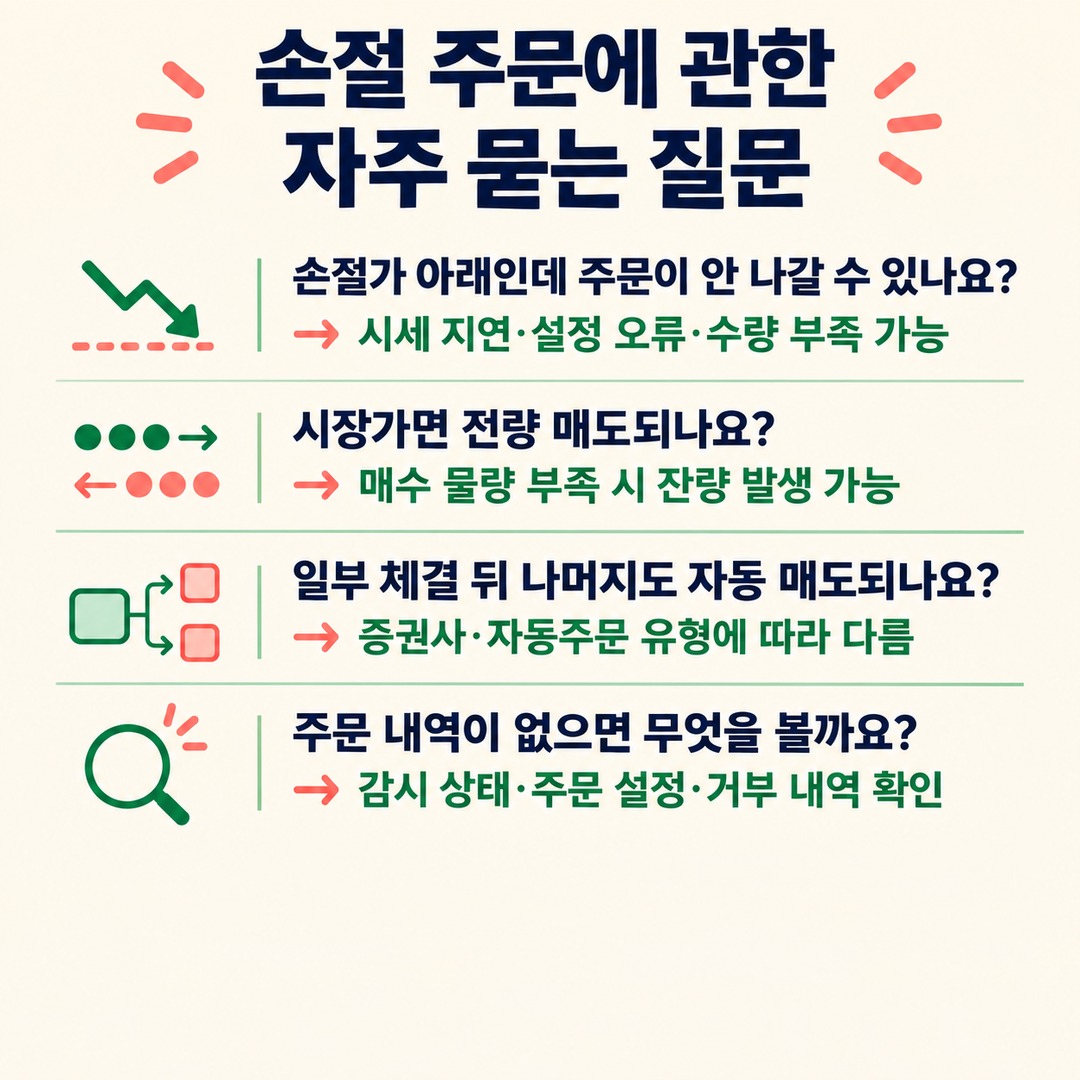
Q. If I use a market order for a stop-loss, will all my shares definitely be sold?
No. A market order simply means that no price is specified. If there are not enough buy orders on the other side, only part of the order may be filled, or some quantity may remain unfilled.
Q. If a stop-loss order is only partially filled, will the rest be sold automatically?
It depends on the brokerage and the type of automatic order. Korea Investment & Securities says its server-based automatic StopLoss monitoring ends once the condition is met, and no additional automatic order is placed for the remaining quantity.
Q. What should I do if the stop condition was met but there is nothing in the order history?
Check the automatic monitoring status, whether the order was set to manual or automatic, the account’s order settings, the selected exchange, and any order rejection history. Contacting the brokerage’s customer service with the time the monitoring condition was met and asking whether the order was sent can help identify the cause.
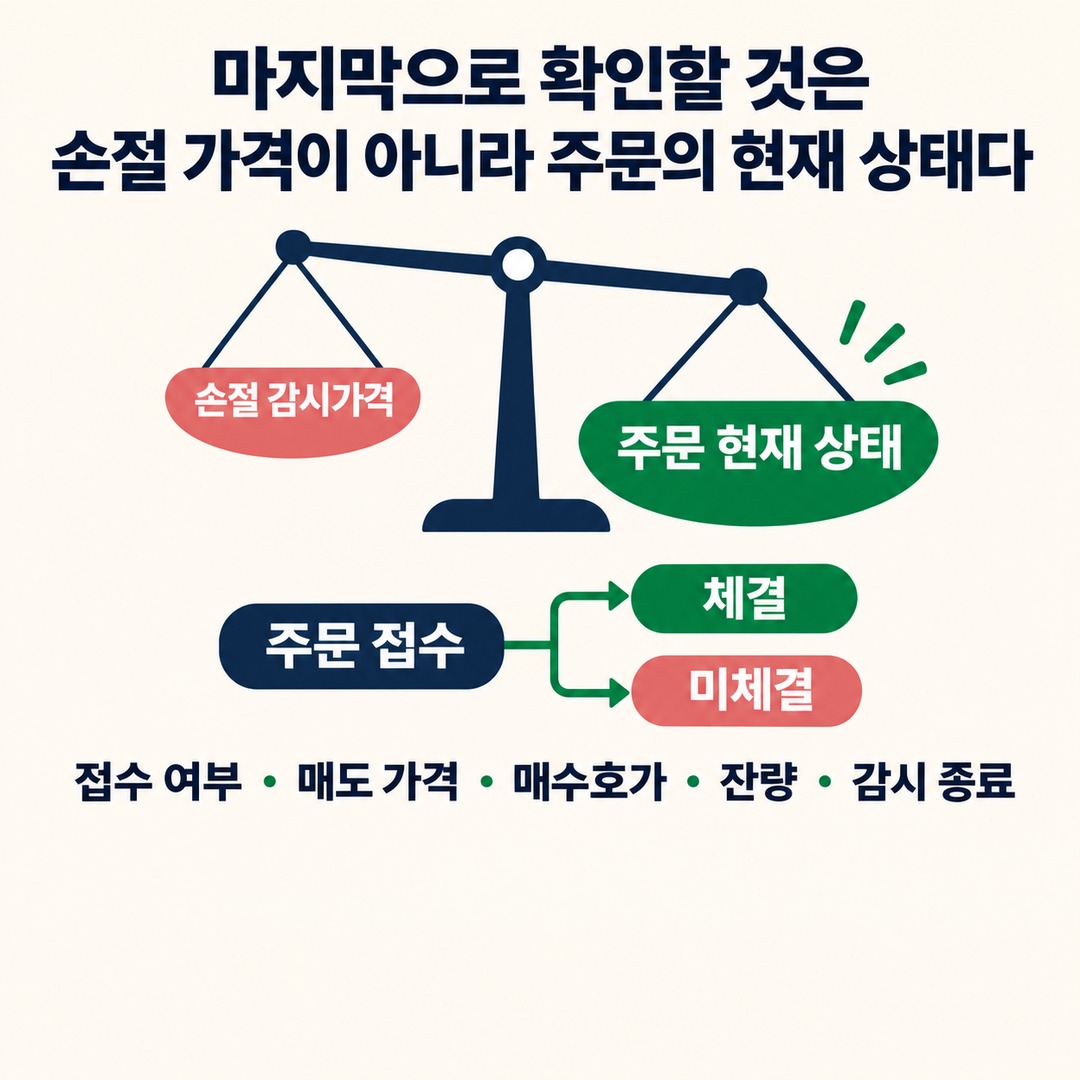
The key thing to check is the order’s current status, not the stop price
A stock stop-loss order can be triggered and still remain unfilled because reaching the stop price and completing an actual trade are two different things.
Keep these three points in mind:
1. The stop-loss monitoring price does not guarantee the actual sale price.
2. A market order may not be filled in full if there are not enough buy orders on the other side.
3. Some brokerages do not place another order for the unfilled quantity after automatic monitoring ends.
So if an order remains unfilled, first check whether it was accepted, the sell price, the buy quote, the remaining quantity, and whether automatic ordering has ended.
When setting a stop-loss order, check not only the trigger condition but also what will happen to any remaining quantity after it is triggered.
※ This article is for general information to help readers understand market activity and is not an investment recommendation for any particular stock or asset. You are responsible for your own decisions and investments.
This post contains Coupang Partners affiliate links. We may earn a commission from qualifying purchases.