

Upbit and Bithumb Crypto Withdrawal Limits After KRW Deposits: How to Check When They Lift and How Much You Can Withdraw

Upbit and Bithumb apply a virtual-asset withdrawal delay of 72 hours after the first KRW deposit and typically 24 hours after subsequent KRW deposits. However, the end of the restriction period does not mean you can withdraw all the coins you hold. Based on the official guidance from each exchange checked on 2026-11-21, how to check the actual release time and the amount available for withdrawal in the app are two separate things to understand.
How do Upbit and Bithumb apply withdrawal limits?
Both exchanges distinguish between the first KRW deposit and subsequent KRW deposits. The standard period is 72 hours for the first deposit and 24 hours for each subsequent deposit.
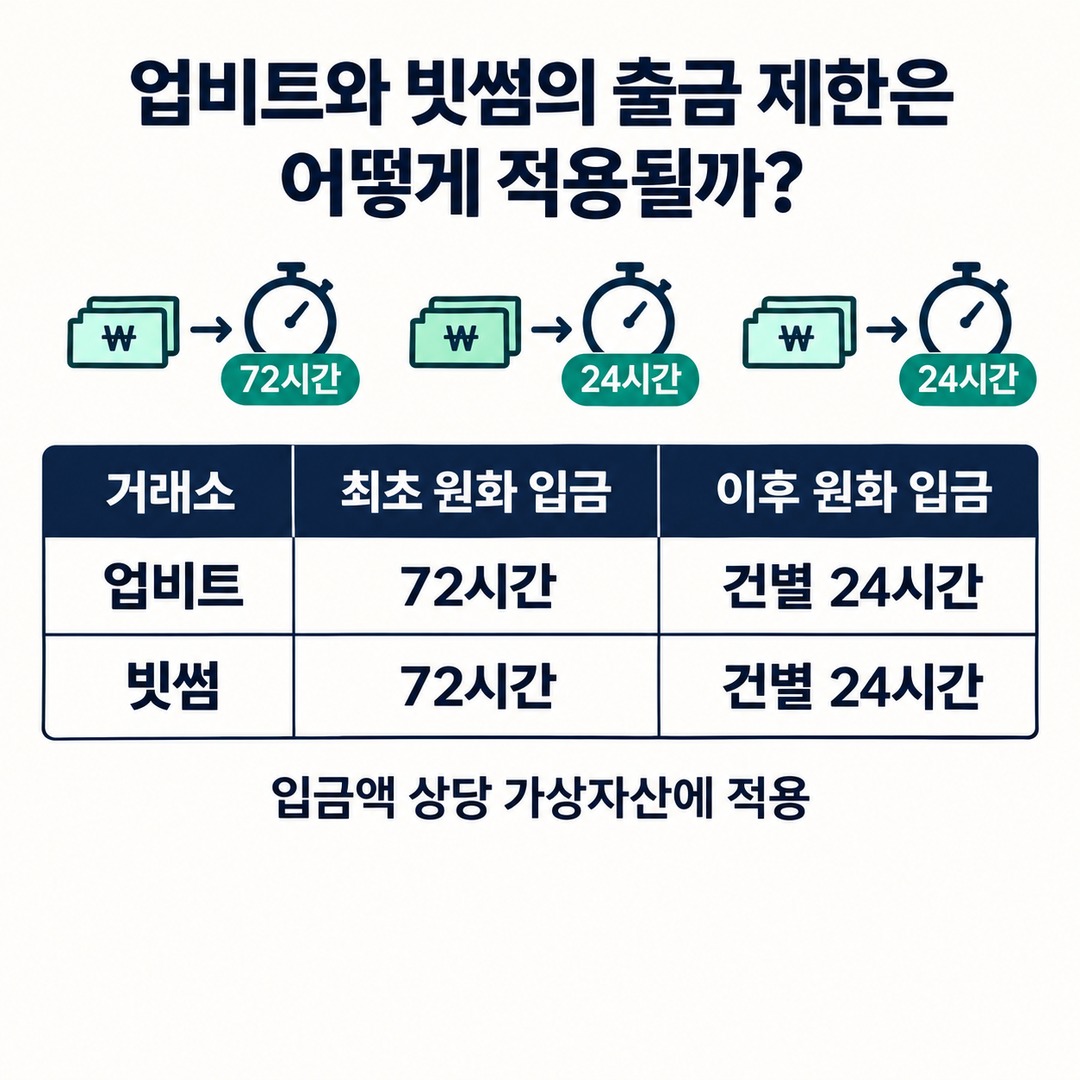
| Category | Upbit | Bithumb |
|---|---|---|
| First KRW deposit | 72 hours | 72 hours |
| Subsequent KRW deposits | 24 hours per deposit | 24 hours per deposit |
| What is restricted | Virtual assets equivalent to the deposit amount | Virtual assets equivalent to the deposit amount |
| When the restriction lifts | Once the time has elapsed since the deposit | Once the time has elapsed since the deposit |
| Where to check in the app | Withdrawal limit details | Question mark next to the amount to send |
On its official customer support page checked on 2026-11-21, Upbit explains the standard periods of 72 hours after the first deposit and 24 hours for each subsequent deposit, as well as conversion to KRW using the market price at the time of withdrawal.
Bithumb also applies different time limits to the first deposit and additional deposits. Bithumb’s official customer support page explains that virtual assets equivalent to an additional KRW deposit can be withdrawn only after 24 hours have passed since the deposit time.
The important point is that 24 hours or 72 hours do not apply as a blanket restriction on every coin in the account. The assets subject to the restriction and the time it lifts can vary by deposit.
How to check when a withdrawal limit lifts on Upbit
On Upbit, you can check the restricted amount, deposit history, and release time on the withdrawal request screen.
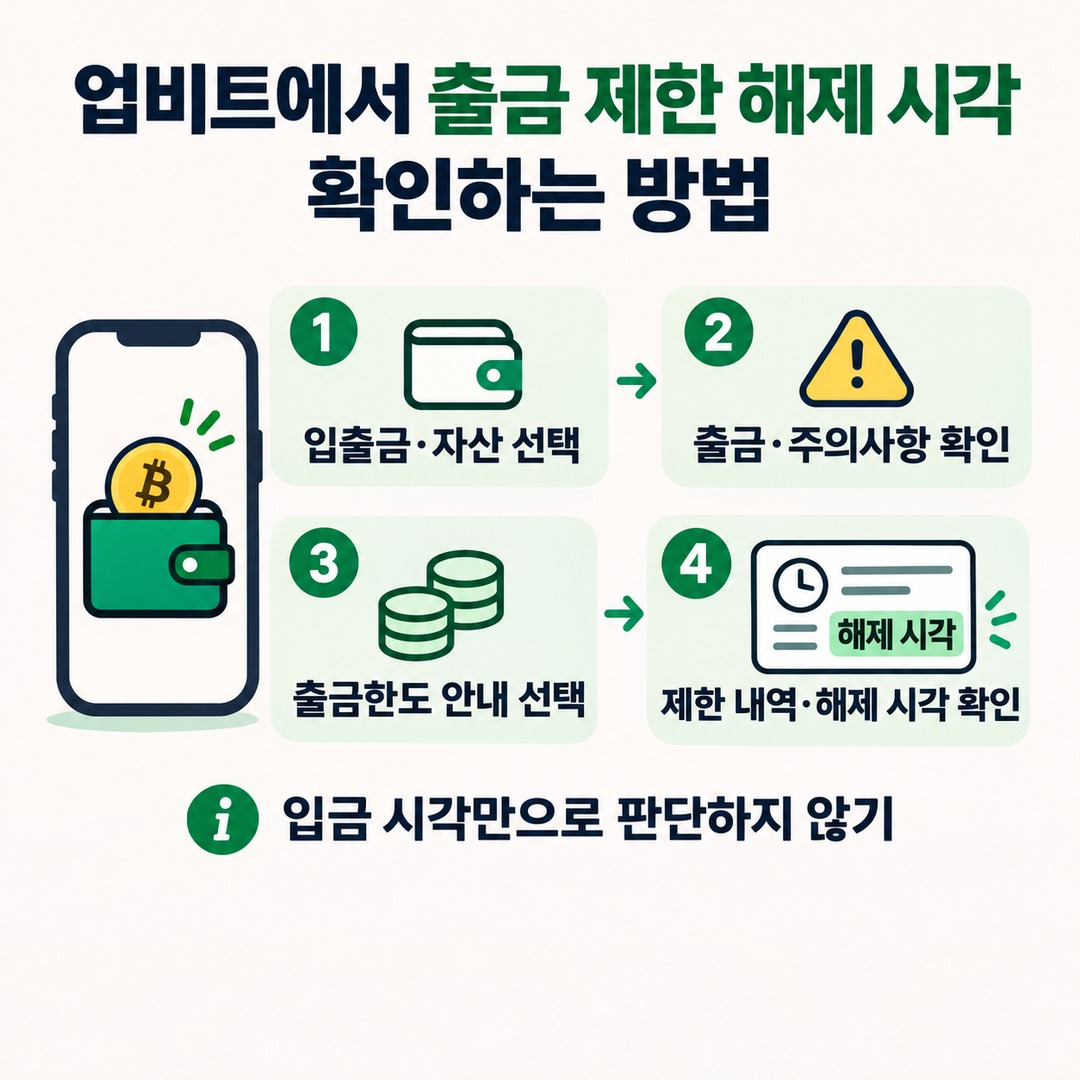
Steps
1. Open the Upbit app.
2. Go to the Deposit/Withdrawal menu at the bottom.
3. Select the virtual asset you want to withdraw.
4. In the Withdrawal menu, review the withdrawal notice.
5. Check the available withdrawal amount and withdrawal limit.

6. If a notice says your limit is restricted because of a KRW deposit within 24 hours, select that button.
7. Check the total amount subject to the withdrawal limit, your KRW deposit history, and the time the withdrawal restriction lifts.
The final step is especially important.
Rather than deciding whether a withdrawal is available by simply adding 24 hours to the KRW deposit time, check the actual restriction details shown in the app.
Upbit’s official guidance states that you can also check the restriction release time in the detailed information.

How to check whether a withdrawal is restricted and the amount on Bithumb
Bithumb says to check for a withdrawal delay by tapping the question mark icon next to the amount to send on the withdrawal screen.
Steps in the mobile app
1. Open the Bithumb app.
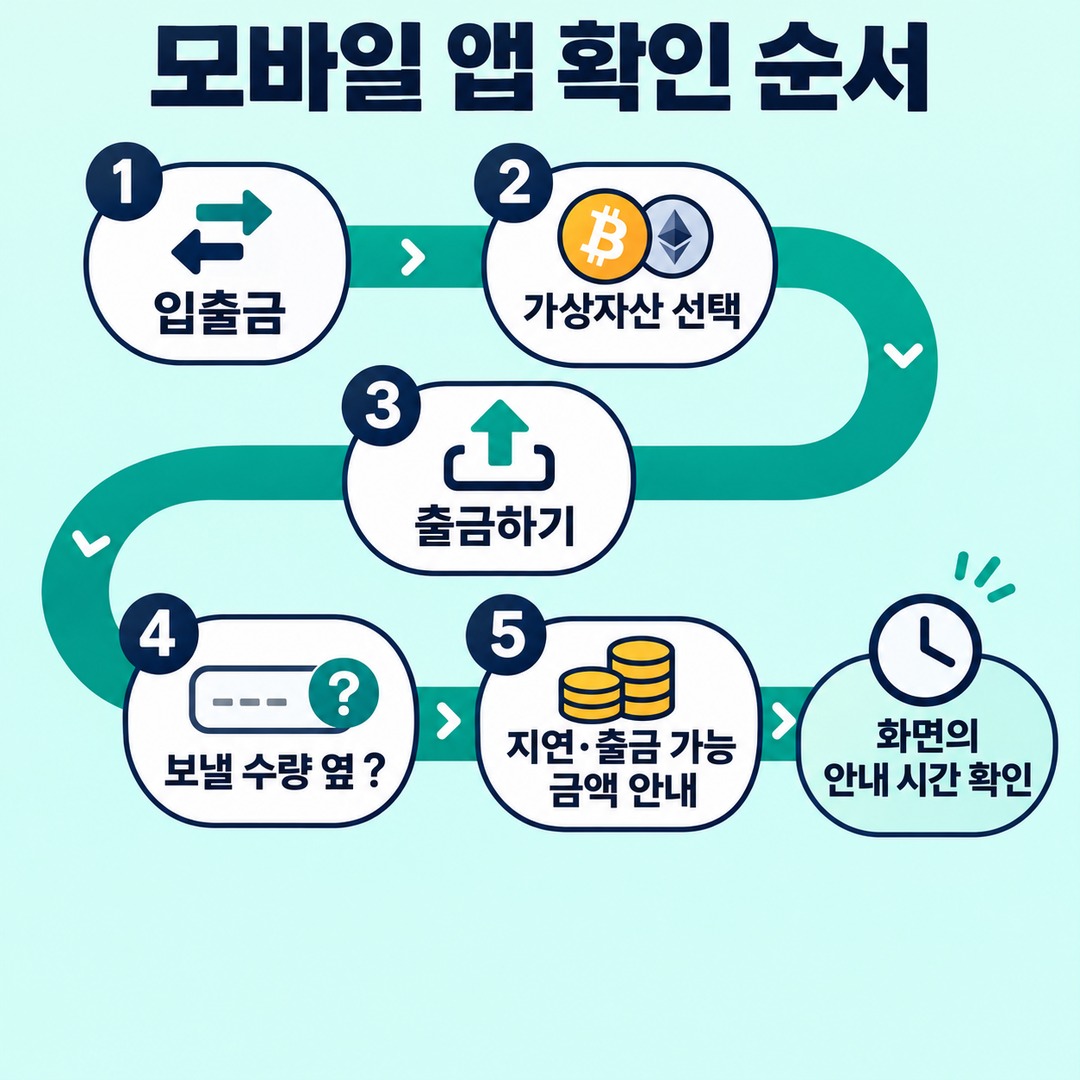
2. Select the Deposit/Withdrawal menu.
3. Select the virtual asset you want to withdraw.
4. Tap Withdraw.
5. Tap the question mark next to the amount to send.
6. Review the notices about withdrawal delays and the amount available for withdrawal.
On a PC, select a virtual asset from the Deposit/Withdrawal menu, then go to the withdrawal screen.
Bithumb Customer Support explains how to check on this screen whether the 72-hour or 24-hour withdrawal delay applies.
Unlike Upbit, the Bithumb guidance reviewed does not name a specific detail field that displays the release time. Check the restriction status and the stated timeframe shown on the screen directly; do not calculate an unconfirmed release time and treat it as definite.
Why can the amount available to withdraw differ from your total holdings?
The amount available to withdraw is not simply the total assets shown on the exchange. It reflects unfilled orders, pending withdrawals, restrictions related to KRW deposits, withdrawal fees, and each member’s 1-day limit.
1. Available withdrawal amount and withdrawal limit on Upbit are different
Upbit distinguishes between two items.
Available withdrawal amount: The amount remaining after subtracting unfilled orders, pending withdrawals, and withdrawal fees from total holdings
Withdrawal limit: The amount after applying the 1-day limit for the member’s tier and restrictions related to recent KRW deposits
Therefore, even if the available withdrawal amount is sufficient, a low withdrawal limit may prevent you from sending the full amount you want.
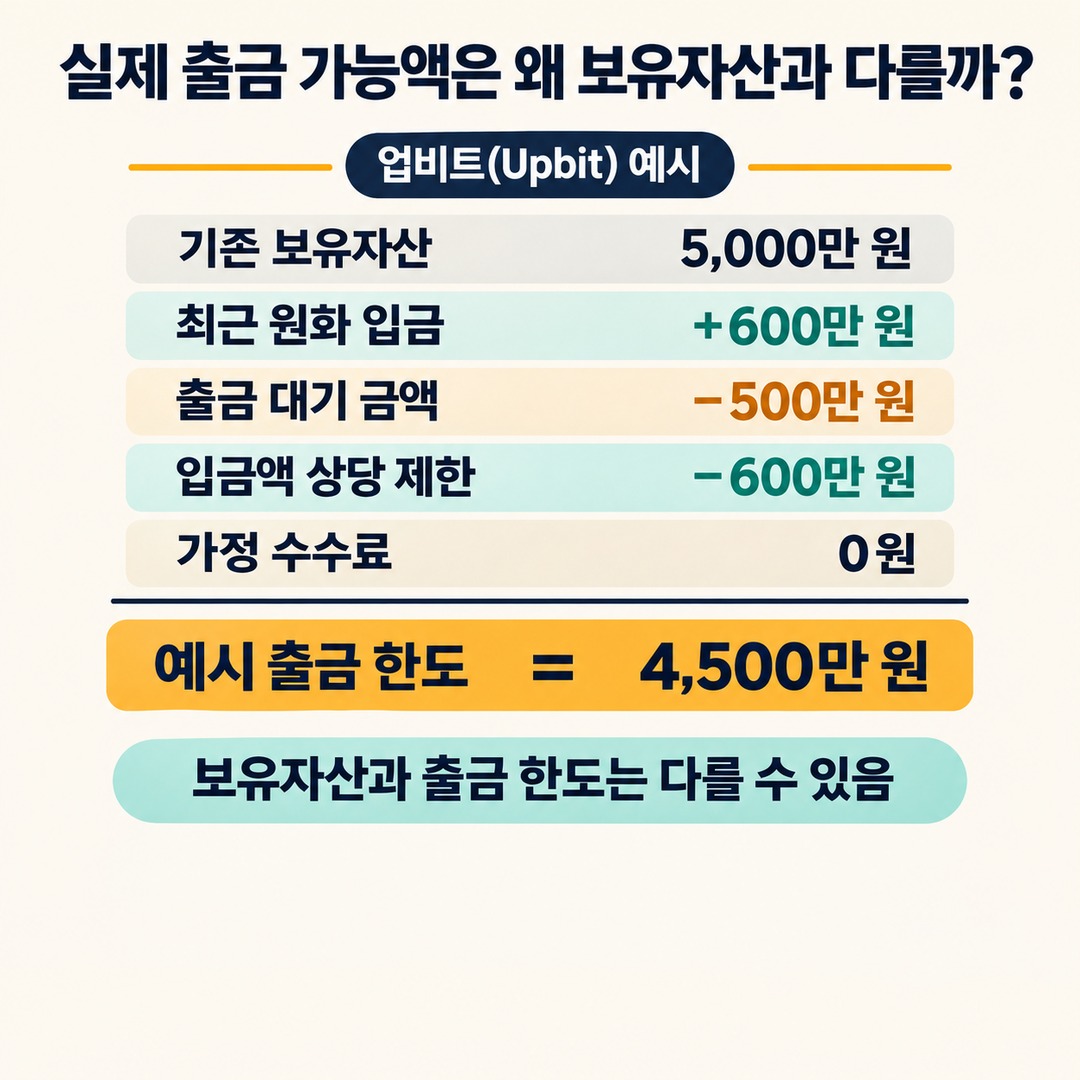
Upbit provides the following calculation example.
| Item | Amount |
|---|---|
| Existing holdings | KRW 50,000,000 |
| KRW deposit within the past 24 hours | KRW 6,000,000 |
| Amount pending withdrawal | KRW 5,000,000 |
| Assumed withdrawal fee | KRW 0 |
| Final withdrawal limit | KRW 45,000,000 |
The author’s calculation is as follows.
5,000 ten-thousand+600 ten-thousand−500 ten-thousand−600 ten-thousand=KRW 45,000,000. The reason for deducting the recent deposit amount KRW 6,000,000 again is that the virtual assets equivalent to that deposit are subject to a withdrawal delay.
This is an example provided by Upbit. In an actual account, the 1-day limit for the member’s tier also applies.
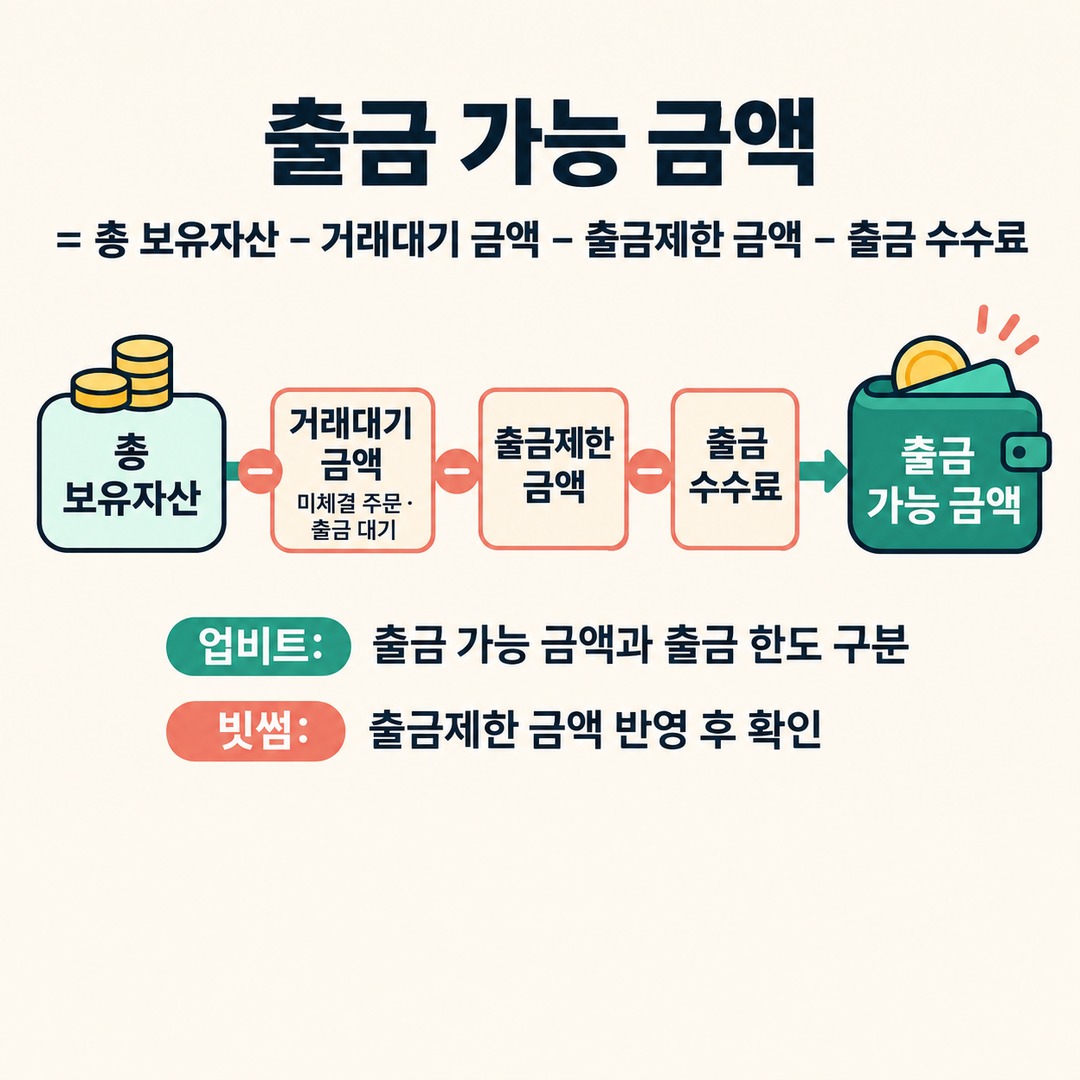
2. Bithumb separately deducts the restricted withdrawal amount
Bithumb’s official calculation method is as follows.
Available withdrawal amount = total holdings − amount pending trading − restricted withdrawal amount − withdrawal fee
Here, the amount pending trading means unfilled orders and pending withdrawals.
There is a difference in the calculation structure to note when comparing Upbit and Bithumb.
| Comparison item | Upbit | Bithumb |
|---|---|---|
| Unfilled orders | Deducted | Deducted |
| Amount pending withdrawal | Deducted | Deducted |
| Deposit delay restriction | Reflected in the withdrawal limit | Deducted as a restricted withdrawal amount |
| Withdrawal fee | Deducted | Deducted |
| Member-specific 1-day limit | Applied separately | Check the account-specific notice |
Having a large balance does not mean you can withdraw the same amount on both exchanges.
In particular, on Upbit, check the available withdrawal amount and the withdrawal limit separately. On Bithumb, check the actual available withdrawal amount after the restricted withdrawal amount has been factored in.
When can you withdraw based on the deposit time?
The following is a hypothetical example to illustrate withdrawal delay periods.
Suppose you deposited KRW at 2 in the afternoon on November 21.
| Deposit type | Deposit time | Standard restriction period | Time when the period elapses |
|---|---|---|---|
| First deposit | November 21 at 14:00 | 72 hours | November 24 at 14:00 |
| Subsequent deposit | November 21 at 14:00 | 24 hours | November 22 at 14:00 |
This calculation assumes the deposit was processed successfully at that time.
If both a first deposit and an additional deposit are subject to restrictions, do not calculate them together using a single release time.
For example, the amount restricted because of the first deposit follows the 72-hour period, while the amount restricted because of a later deposit follows the 24-hour period for that additional deposit.
If you made multiple deposits, check the time and restricted amount for each deposit to get an accurate result.
What if you still can’t withdraw your crypto after the restriction period has passed?
If 24 or 72 hours have passed and you still cannot withdraw, checking only the delay related to KRW deposits may not be enough.
Other withdrawal restrictions may still apply.
Additional items to check on Upbit
Whether any buy or sell orders remain unfilled
Whether a previous withdrawal request is still being processed
Whether you have exceeded the 1-day withdrawal limit for your membership tier
Whether the amount accounts for the withdrawal fee
Whether you meet the minimum withdrawal amount for the virtual asset
Whether a separate restriction applies due to suspicious transaction monitoring
Upbit says it may restrict KRW and digital asset deposits and withdrawals if it suspects fraudulent activity.
Additional items to check on Bithumb
Whether any amount remains restricted under the withdrawal delay system
Whether there are unfilled orders or pending withdrawals
Whether the withdrawal fee has been factored in
Whether the receiving exchange is a VASP that supports withdrawals
Whether the address or account holder’s name needs to be verified under the Travel Rule
Whether a separate withdrawal restriction applies due to an FDS review
Bithumb says all virtual asset withdrawals are processed after review by its Fraud Detection System (FDS). If a transaction is flagged as matching a financial fraud pattern, withdrawals may be restricted for up to 72 hours.
Therefore, do not assume that all withdrawal restrictions will automatically disappear just because 24 hours have passed since the deposit.
What to check before making a withdrawal
If you plan to send crypto to another exchange or a personal wallet, it is efficient to check the following in order.
1. Check whether this is your first KRW deposit or a subsequent deposit.
2. Check the processing time for each deposit.
3. Check the restricted amount and any release information on the withdrawal screen.
4. Check the available withdrawal amount and the withdrawal limit separately.
5. Check for unfilled orders and pending withdrawals.
6. Check the actual amount you can send after fees are deducted.
7. Check the receiving exchange or personal wallet’s address and network, as well as any Travel Rule requirements.
Most importantly, check the amount shown on the exchange screen again just before submitting the withdrawal request. If the coin’s market price changes, its KRW-converted value may also change.
Frequently asked questions Q. My withdrawal is still restricted even though 24 hours have passed since my KRW deposit.
Check whether any other restrictions remain, such as those due to unfilled orders, pending withdrawals, member-specific withdrawal limits, or suspicious transaction detection, in addition to the 24-hour deposit delay.
Q. Can I withdraw all my coins once 72 hours have passed since my first deposit?
No. 72 hours is the standard delay for virtual assets equivalent to the amount of the first deposit. If you made additional deposits afterward, the 24-hour restriction for each of those deposits may apply separately.
Q. Can I buy and sell coins while withdrawals are restricted?
Bithumb says that during the withdrawal delay period, users can still use services such as buying and selling virtual assets with KRW, lending, staking, and KRW withdrawals. However, withdrawing virtual assets externally is subject to a separate restriction.
Q. Do Upbit and Bithumb lift withdrawal restrictions at the same time?
The standard periods are the same: 72 hours after the first deposit and 24 hours after subsequent deposits. However, deposit processing details and restriction status may differ by exchange and account, so check each app individually.
If you cannot withdraw crypto after depositing KRW, first check the restriction details on the withdrawal screen. Then check the release time and the amount actually available to withdraw separately. Checking the restricted amount and the amount pending trading, instead of simply waiting, can help you identify more accurately why the withdrawal is blocked.
※ This article is for informational purposes to help readers understand market developments. It is not investment advice for any particular security or asset. You are responsible for your own investment decisions.