

How to Use Toss Sharelink | From Registration to Creating Links on Mobile and PC
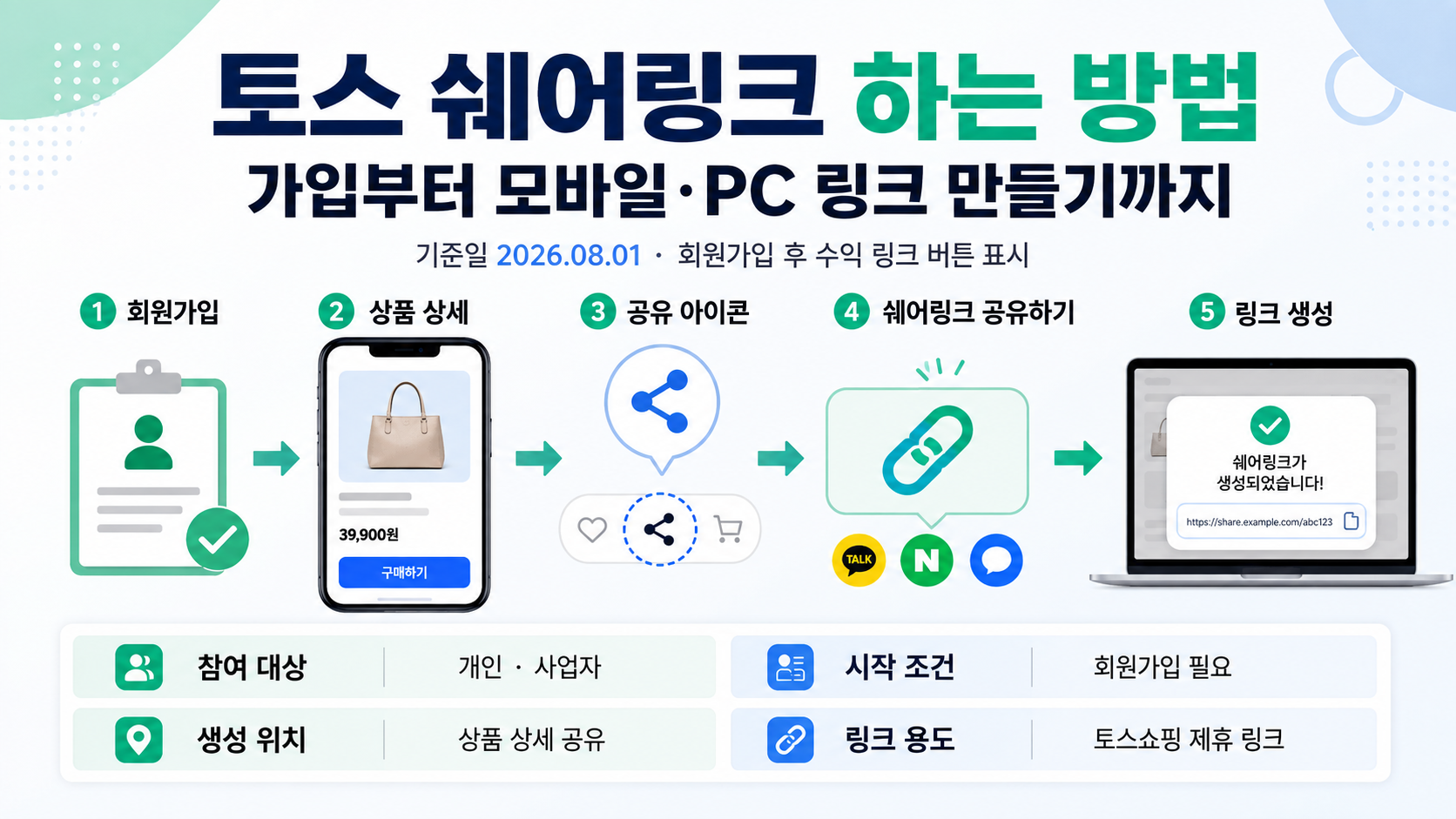
You can create a Toss Sharelink by registering on the Sharelink website, opening a product detail page in Toss Shopping, tapping the share icon, and selecting 'Share via Sharelink.' As of 2026-08-01, both individuals and businesses can participate. The button for generating commission-earning links appears in the app only after registration is complete.
What Is Toss Sharelink?
Toss Shopping Sharelink is a service that lets users create affiliate links for Toss Shopping products and share them on blogs or social media.
When someone purchases a product through one of these links and the purchase is confirmed, a predetermined commission is recorded as earnings. Unlike an ordinary product-sharing link, a Sharelink contains information identifying the Sharelink member who is eligible to receive commissions.
The currently advertised commission rate is 10% of the sales amount. However, this rate is presented as a limited-time promotion, so it may change in the future.
What to Prepare Before Getting Started
Having the following items ready before registration will make the process smoother.
| Item | What to Check |
|---|---|
| Toss account | A Toss account registered in your name and a mobile phone |
| Promotional channel | A blog, YouTube channel, Instagram account, or another channel where you can share links |
| Payment information | A bank account in your name or your business's name for receiving commissions |
| Registration category | Whether you are an individual, sole proprietor, or corporation |
| Advertising disclosure | A statement informing readers that you may receive commissions through the links |
Individuals and sole proprietors can register online. Online registration may be restricted for corporations, so corporate applicants should contact Sharelink customer support to confirm the separate contracting procedure.
Sellers who offer products on Toss Shopping can also register. However, transactions involving products sold by their own stores are excluded from commission payments. Copying Sharelinks for products from their own stores may also be restricted.
How to Register for Toss Sharelink
Unlike the previous registration process, you no longer need to search for an application form on Instagram first. You can now begin registration directly through the official Sharelink website.
1. Visit the Toss Shopping Sharelink website.
2. Select 'Sign Up' or 'Get Started.'
3. Verify your identity using the Toss app.
4. Select your registration category, such as individual or business.
5. Enter information about the blog or social media channels where you plan to promote products.
6. Register the bank account where you want to receive payments and provide the required information.
7. Confirm that the registration completion screen appears.
The required fields may vary depending on your registration category or service updates. If you are asked to submit identification or business-related documents, follow the latest submission requirements displayed on the screen.
After completing registration, reopen the Toss app. You should then be able to access the Sharelink feature from the product-sharing menu.
How to Create a Sharelink on Mobile
On mobile devices, you generate links from product detail pages in Toss Shopping within the Toss app.
1. Open the Toss app.
2. Go to Toss Shopping.
3. Select the product you want to share.
4. Tap the share icon at the top of the product detail page.
5. Select 'Share via Sharelink.'
6. Copy the generated link or select an app where you want to share it.
7. Include both the link and an advertising disclosure in your blog or social media post.
You must select 'Share via Sharelink' rather than the ordinary 'Share Product' option to generate a link that tracks commission earnings.
How to Create a Sharelink on PC
You can also generate commission-earning links on a PC through the Sharelink website.
1. Log in to the Toss Shopping Sharelink website on your PC.
2. Navigate to the 'Create Link' or product search menu.
3. Search for the product you want to share.
4. Select the product, then click 'Generate Link' or 'Copy Link.'
5. Insert the copied link into your blog, website, YouTube description, or another promotional channel.
The PC method is convenient when you want to search for products and insert links while writing blog posts. Menu names may differ from those on mobile, so look for options similar to 'Create Link,' 'Copy Link,' or 'Start Monetizing.'
What to Do If the 'Share via Sharelink' Button Is Missing
The most common reasons the button does not appear are incomplete registration or registration information that has not yet been reflected in the Toss app.
Check the following in order:
Confirm that your registration is complete on the Sharelink website.
Make sure the account used for registration matches your current Toss account.
Completely close the Toss app and reopen it.
Update the Toss app through the App Store or Google Play Store.
Check whether the button is also missing for other Toss Shopping products.
Check whether the product is restricted from Sharelink participation.
Sharelink generation may be restricted for certain products under Toss's internal policies or at a seller's request. If the button is missing only for a particular product, open another product page to compare.
Which Purchases Qualify for Commissions?
If someone clicks your Sharelink and makes a purchase within 24 hours, the transaction may qualify for commission tracking.
Purchasing the originally shared product is classified as a 'direct purchase,' while purchasing a different product after clicking the link is classified as an 'indirect purchase.' According to the current guidance, indirect purchases are eligible for the same commission rate as direct purchases.
| Situation | Commission Eligibility |
|---|---|
| Someone else purchases the shared product | Eligible |
| Someone purchases a different product within 24 hours of clicking the link | Eligible |
| You purchase through your own link | Excluded |
| An order is canceled or returned | Excluded if the purchase is not confirmed |
| A restricted Sharelink product is purchased | Excluded |
| A product from a store you operate is purchased | Excluded |
Actual commission attribution may vary depending on the last affiliate link clicked and the purchasing process. The most accurate way to check estimated earnings is through the performance or results dashboard on the Sharelink homepage.
Example Commission Calculation
Assuming the current commission rate of 10% applies, the calculation is as follows.
Confirmed purchase amount: KRW 50,000
Applicable commission rate: 10%
Estimated earnings: KRW 50,000 × 10% = KRW 5,000
The amount above is a pre-tax estimate calculated by the author.
Actual earnings may vary depending on rounding for individual orders, cancellations, returns, taxes, whether products are restricted, and the member's registration category. If the commission rate changes, the calculation results will also change.
When Will Commissions Be Paid?
As a general rule, earnings from confirmed purchases are settled on 25 of the month following the month in which the qualifying transactions occurred.
For example, if a purchase is made and confirmed during August, it will be included in the settlement for September 25. If an order is canceled or returned, estimated earnings may differ from confirmed earnings.
As of June 2026, the minimum payout threshold shown in the official FAQ is KRW 10. Some information screens may still display the previous threshold of KRW 10,000, so check the latest requirements on the settlement details screen before payment.
Individual members may receive payments after income tax and local income tax have been withheld. Sole proprietors and corporations may be subject to separate procedures, such as tax invoice approval, depending on their business category.
Do You Have to Include an Advertising Disclosure on Blogs and Social Media?
When publishing Sharelinks, you must clearly disclose your financial relationship so readers can easily understand that you may receive commissions through those links.
The official guidance provides the following example disclosure:
'This post is part of Toss Shopping Sharelink promotional activities, and I receive a commission in connection with these activities.'
For blogs, it is advisable to place the disclosure near the beginning of the post or close to the product link. Avoid hiding it in small text at the bottom of the article or using vague statements such as 'Contains some links' without clearly explaining the financial relationship.
You should also be careful about repeatedly sending links to acquaintances through KakaoTalk, text messages, or similar channels. Sending large volumes of unsolicited promotional messages or encouraging clicks through inappropriate methods may result in account restrictions or violations of the service's operating policies.
What Has Changed From the Previous Registration Process?
Some search results still contain older articles explaining that users must complete an Instagram participation application and wait several days for approval.
The current official website states that individuals and businesses with channels where they can share links may register directly. Therefore, if you cannot find the Instagram application screen mentioned in an older article, that does not mean the service has been discontinued.
The payment process should also be checked against the current official policy. Rather than relying on older articles describing 'Toss Points paid within D+2 business days,' verify the current policy regarding payment on 25 of the following month for confirmed purchases.
Common Mistakes When Getting Started
Copying an ordinary product-sharing link and assuming it is a Sharelink.
Looking only for the sharing button in the app before completing registration.
Making purchases directly through your own link.
Failing to disclose that you may receive commissions in your posts.
Counting canceled or returned orders as confirmed earnings.
Assuming the 10% commission rate will remain unchanged indefinitely.
Repeatedly sending unsolicited links to other people.
When starting out, a safer approach is to generate a single link, create a test post, and then check the performance dashboard to confirm that clicks are being recorded correctly.
Frequently Asked Questions
Does Toss Sharelink Require Separate Approval?
The current process allows users to register through the official website. Additional verification procedures may apply depending on the registration category or submitted information, but you no longer need to rely exclusively on the previous Instagram participation application process.
Can I Register Even If I Have Few Followers?
The official guidance states that people who operate channels where they can share links are eligible to participate. However, fake channels or channels that violate operating policies may be restricted.
Can I Earn Commissions If Someone Buys a Different Product From the One I Shared?
If someone purchases a different product within 24 hours of clicking your link, the transaction may qualify as an indirect purchase. Purchases made by the link owner and purchases of restricted products are excluded.
Will the 10% Commission Rate Remain in Effect?
The current 10% rate is advertised as a limited-time promotion. You should check the latest commission rate whenever you publish or update a post.
Can Sellers Register for Sharelink?
Toss Shopping sellers can also register. However, transactions involving products sold by stores they operate are not eligible for commission payments, and copying Sharelinks for those products may be restricted.